You are not logged in.
- Topics: Active | Unanswered
#26 2026-08-04 20:08:58
- daffyduck
- Member
- Registered: 2026-06-25
- Posts: 118


Re: Brainstorming: Improving Xfce's Out-of-the-Box Experience
For me, I would likely dismiss your "wizard" right from the start as I am particular about my desktops and set them up for my usage. To each is own.
Also, I HATE when I'm asked "Are You Sure". If I wasn't I wouldn't have dismissed it. Forcing a user to jump through hoops enrages me. Do as I ask, no more, no less. This is part of the reason I left behind MS over 20 years ago.
For a power user like you, who knows exactly how to setup the desktop, a wizard is unnecessary. So, you aren't the target audience for this application. For an experienced user, disabling the wizard permanently only takes three extra clicks, which is required only once on new XFCE installations. The wizard won't show up on existing installations or upgrades.
This tool is intended for new users who have never used XFCE before and don't yet know what DPI or locale settings are. For those users, a few extra clicks and "Are you sure" prompts are a necessary safety net to prevent accidental exits, a trade-off for getting a guided experience.
If you'd like to be constructive, could you please direct me to the best place to formally submit this proposal once it is completed, to ensure it reaches the right people?
^^^^^ &```& ^^^^^^^^^^^^^
.&_ oO_&-..--. daffyduck
( __ -/..--' Mark solved threads as [SOLVED] to make
. ' -__- ' it easier for others to find solutions.
Offline
#27 2026-08-04 20:33:32
- eriefisher
- Wanderer
- From: ON, Canada
- Registered: 2008-10-25
- Posts: 1,026
- Website


Re: Brainstorming: Improving Xfce's Out-of-the-Box Experience
could you please direct me to the best place to formally submit this proposal once it is completed, to ensure it reaches the right people?
On the top right of the forum you will see a "Bugs" link. This is where it all happens.
But it's all right, when you're all in pain and you feel the rain come down
It's alright, when you find your way, then you see it disappear
It's alright....
Chris Cornell
Offline
#28 2026-08-04 22:04:57
- daffyduck
- Member
- Registered: 2026-06-25
- Posts: 118
Re: Brainstorming: Improving Xfce's Out-of-the-Box Experience
I suspect xfce4-session is the right component, but I'm not sure if there is a better place for new "core components and applications," as there are no specific instructions for such proposals.
If xfce4-session is the correct place, this seems to be the link:
https://gitlab.xfce.org/xfce/xfce4-session/-/issues/new
However, new registrations appear to be disabled, and users are instead directed to log in via third parties. This feels like an unnecessary barrier for anyone just trying to submit a bug report. How long has this been going on? Since I strongly dislike using third-party trackers for logins, this will likely stall my proposal indefinitely until the registration issue is fixed.
^^^^^ &```& ^^^^^^^^^^^^^
.&_ oO_&-..--. daffyduck
( __ -/..--' Mark solved threads as [SOLVED] to make
. ' -__- ' it easier for others to find solutions.
Offline
#29 2026-08-04 22:10:34
- eriefisher
- Wanderer
- From: ON, Canada
- Registered: 2008-10-25
- Posts: 1,026
- Website
Re: Brainstorming: Improving Xfce's Out-of-the-Box Experience
The account "issue" was implemented some time ago now due to excessive spam.
Also, refer to my earlier comment "jump through hoops".
But it's all right, when you're all in pain and you feel the rain come down
It's alright, when you find your way, then you see it disappear
It's alright....
Chris Cornell
Offline
#30 2026-08-04 22:31:34
- daffyduck
- Member
- Registered: 2026-06-25
- Posts: 118
Re: Brainstorming: Improving Xfce's Out-of-the-Box Experience
The account "issue" was implemented some time ago now due to excessive spam.
Also, refer to my earlier comment "jump through hoops".
Could you be more specific about the timeframe? Was this approx. six months ago, a year, or longer?
As for "jumping through hoops", I don't think the two are comparable.
- A few clicks in a GUI is a minor inconvenience, not the same as a multi-step registration process.
- A registration process that requires email confirmation and involves handing over private data (like an IP address) to third-party trackers is a significant privacy and security concern.
On a related note, does submitting "work items" work? It doesn't seem to be asking for any credentials ???
Since I've never used that process, I don't want to accidentally submit a "dummy test" item just to check. I'm referring to this page:
https://gitlab.xfce.org/xfce/xfce4-session/-/work_items
^^^^^ &```& ^^^^^^^^^^^^^
.&_ oO_&-..--. daffyduck
( __ -/..--' Mark solved threads as [SOLVED] to make
. ' -__- ' it easier for others to find solutions.
Offline
#31 2026-08-04 22:38:06
- eriefisher
- Wanderer
- From: ON, Canada
- Registered: 2008-10-25
- Posts: 1,026
- Website
Re: Brainstorming: Improving Xfce's Out-of-the-Box Experience
Could you be more specific about the timeframe? Was this approx. six months ago, a year, or longer?
Not sure. It's been well over a year, maybe two????
On a related note, does submitting "work items" work? It doesn't seem to be asking for any credentials ???
Since I've never used that process, I don't want to accidentally submit a "dummy test" item just to check. I'm referring to this page:
https://gitlab.xfce.org/xfce/xfce4-session/-/work_items
I've never submitted code, only bug reports. I'm not a programmer/coder.
But it's all right, when you're all in pain and you feel the rain come down
It's alright, when you find your way, then you see it disappear
It's alright....
Chris Cornell
Offline
#32 2026-08-05 04:15:51
- CwF
- Moderator
- Registered: 2018-01-28
- Posts: 351

Re: Brainstorming: Improving Xfce's Out-of-the-Box Experience
disabling the wizard permanently only takes three extra clicks, which is required only once on new XFCE installations.
The correct way would be to create a meta-package 'Xfce4-introduction' and have all the goodies and DE as dependencies. The traditional packages are then still available for a minimal expert install. The group responsible for development and upkeep of said package could easily be any derivative distro maintainer and not necessarily Xfce proper. I don't want to click to dismiss something that shouldn't be.
Any down tick you see daffyduck in Xfce usage could very well be the result of a fading X11 audience.
Offline
#33 2026-08-05 06:13:11
- daffyduck
- Member
- Registered: 2026-06-25
- Posts: 118
Re: Brainstorming: Improving Xfce's Out-of-the-Box Experience
The correct way would be to create a meta-package 'Xfce4-introduction' and have all the goodies and DE as dependencies. The traditional packages are then still available for a minimal expert install. The group responsible for development and upkeep of said package could easily be any derivative distro maintainer and not necessarily Xfce proper. I don't want to click to dismiss something that shouldn't be.
That would be an excellent solution, relieving experienced users of even those "three extra clicks."
In the worst case, it would only be three extra clicks, and only for new installations.
Any down tick you see daffyduck in Xfce usage could very well be the result of a fading X11 audience.
That could be true, but it's hard to know for sure. I don't think X11 can explain it alone. X11 isn't completely dead, and most distros would ship it anyway to satisfy long-term users.
Let's be real: the other two major DEs (KDE and GNOME) have made significant improvements in the last few years, while Xfce has moved slowly. That is the more likely reason. Therefore, a "Welcome Wizard" / "Xfce4-introduction" would help Xfce a lot, at least (obviously) in my opinion.
Also take into account that Linux on desktops has been gaining popularity, and KDE and GNOME have managed to attract most of those new users. That part is rather obvious from the statistics I have.
Anyway, those are just my two cents. No one has to agree with me, but that's my perspective.
Added later 3 h 26 min 46 s:
--------------------------------
It would be good to move the Skip button about 60px to the right compared to where it is placed in the earlier mockup, so it doesn’t end up in the same position as the Back button will occupy on the later dialogues. This would make it more obvious to the user that it’s a different button with a different function.
Here is a link back to the post with the mockup:
https://forum.xfce.org/viewtopic.php?pid=83251#p83251
A link back to the post with description of command-line arguments for "xfce-first-run", and the "first-run.conf" file contents description:
https://forum.xfce.org/viewtopic.php?pid=83228#p83228
A link back to autorun considerations and the syntax of identifiers in the "first-run.conf" file:
https://forum.xfce.org/viewtopic.php?pid=83245#p83245
Here is the mockup again, same image as before: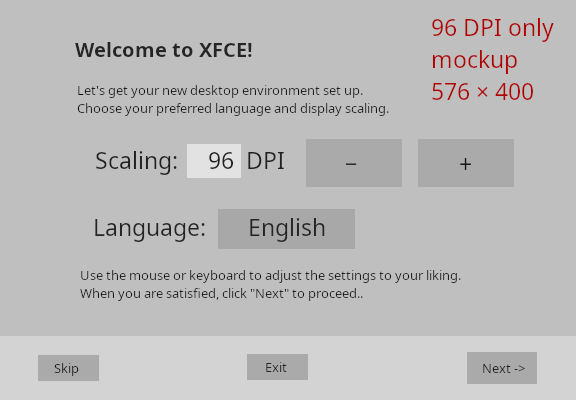
Added later 4 h 04 min 31 s:
Some errata:
- The original description of the "Welcome/dpi/language" dialogue forgets to mention the "DPI" label, which should be present as displayed on the mockup.
- The dialogue description says: "if the dialogue cannot fit the screen, the application should exit immediately". If the application exits immediately due to that reason, it might also be wise to set "first-run-autorun" xfconf flag to false.
Added later 4 h 25 min:
In the "exit/quit" popup, the description states:
Checkbox: "Don't show this wizard again" (initially not checked)
Would it be safer to have this box checked by default? If the Welcome wizard autoruns on the next reboot, it might overwrite Xfce settings and options the user has modified in the meantime. This would also reduce the number of clicks required to permanently disable the wizard to two clicks.
Added later 5 h 36 min 10 s:
The correct way would be to create a meta-package 'Xfce4-introduction' and have all the goodies and DE as dependencies. The traditional packages are then still available for a minimal expert install. The group responsible for development and upkeep of said package could easily be any derivative distro maintainer and not necessarily Xfce proper. I don't want to click to dismiss something that shouldn't be.
Just to clarify, regarding vanilla Xfce installations (like Arch Linux) and other distros that follow an "as is upstream" policy: the "Xfce defaults" should include the "xfce4-first-run" program in the recommended installation, with autorun set up as it was described:
https://forum.xfce.org/viewtopic.php?pid=83245#p83245
The intent is for vanilla installations to have xfce4-first-run fully enabled and configured by default.
If a distro wants to exclude the "xfce4-first-run", separate it into a different package, or disable the autorun by setting first-run-autorun=false, that is, of course, their choice. Ensuring these modifications are easy to make is important.
Last edited by daffyduck (2026-08-05 10:19:10)
^^^^^ &```& ^^^^^^^^^^^^^
.&_ oO_&-..--. daffyduck
( __ -/..--' Mark solved threads as [SOLVED] to make
. ' -__- ' it easier for others to find solutions.
Offline
#34 2026-08-05 15:20:43
- deleted_08102026
- Member
- Registered: 2024-02-12
- Posts: 71

Re: Brainstorming: Improving Xfce's Out-of-the-Box Experience
I generally dislike "first-run wizards", but if this ever goes anywhere, please don't use this kind of language "Let's get your new desktop environment set up.", "Oops, something went wrong", and similar.
Offline
#35 2026-08-05 15:46:50
- Uityyy
- Member
- From: Central Texas
- Registered: 2026-05-13
- Posts: 6
- Website


Re: Brainstorming: Improving Xfce's Out-of-the-Box Experience
Hi all! At the beginning of the year I got annoyed that most current Xfce live ISOs have fewer theming options than XUbuntu did 20 years ago and started building my own. Here are some thoughts after half a year playing with Xfce themes:
Things I wish distos would do tomorrow:
1. Ship a wider range of looks out-of-box. A minimal set might look something like:
- Bright: Adwaita and Adwaita icons
- Midtone: Greybird and Elementary Xfce icons
- Dark: Adwaita dark and... hmm, a lot of flat icon sets like Papirus look good on the air surface, but if you're actually using dark mode in a dark room so many of them have the problem of bright-white document icon flash bangs.
- Skeuomorphic: Clearlooks-Phenix-Sapphire (from Devuan) with GNOME icons
2. Provide out-of-box options for escaping modern UI fads that annoy some people.
I'm talking about things like having scrollbars that autohide and GTK3 scrollbars that jump arbitrarily far when the trough is clicked rather than by one page as both Windows and Mac OS used to do. These things are all configurable. They are *not* in the Xfce settings GUI, and many people do not know how to configure them or even that they can be changed. The easy solution is just to include a GTK theme or two like Clearlooks-Phenix-Sapphire that sets traditionalist options at the theme level.
3. Stop using 1px window borders. (I'm looking at you Greybird/XUbuntu.) They make grabbing window-resize handles very hard at higher screen resolutions.
Things I would change about Xfce itself if I had unlimited time:
1. Load the desktop background before other UI elements the way Windows traditionally did. Right now you see the panel first, most everything else, and lastly the desktop icons followed by the desktop background. A half-loaded UI With black background just looks trashy.
2. Add a rule to xfdesktop that an icon you are already dragging can never be a drag-and-drop target. This should vastly cut down the number of times people accidentally launch applications when trying to rearrange desktop icons.
3. Modify xfdesktop to respect existing desktop icon arrangements as much as possible when switching monitors. The current behavior is a horror that needs to die.
4. Add a minimum-border-width option to Window Manager Tweaks. Set it to 1 and get the current behavior. Set it to anything higher than 1, and xfwm4 themes with narrow window borders are treated as if they had wider borders for the purposes of registering clicks, and you can resize windows by clicking and dragging from the window shadow rather than the extract right pixel. The nice thing about this setup is that a) No existing window manager theme has to change to enable the easier-to-grab resize handles b) anyone annoyed by getting a resize handle when they wanted to click the corner of a lower-in-stack window can turn it off.
5. Add a global-themes settings panel. Right now you have to select the GTK theme, icon theme, and desktop background separately. Being able to do so is *great*, but being able to try on complete looks faster or save existing setups to come back to is also nice. There's an existing solution to this called xfce-theme-manager on GitHub, and I use it extensively, but it ia) is still a gtk2 app and b) duplicates some existing Xfce settings panels. My preferred future solution would not be a gtk3 port of this whole application but rather an official Xfce package that adds Global Themes as the first tab in the Appearance settings when installed -- and only when installed so that people who consider this extra tab clutter don't have to have it, rather like how Panel Profiles currently works but all in one window.
6. Build my own first-run app. I personally wouldn't build one for Xfce as a whole but rather a very silly one with a cartoon character for people nostalgic for Microsoft Office 2000 office assistants. Like, "It looks like you booted a Linux live environment. Would you like to? - change the UI theme - enable accessibility tools..."
7. Add a system for changing UI colours without having to write a whole new gtk3 theme in your preferred colours.
And yeah, the whole way Xfce currently handles HiDPI -- or worse, multiple monitors of radically different resolutions -- is kind of a mess, and I haven't figured out any great solutions yet other than that a few more jumbo xfwm4 themes are in order.
Added later 29 min 08 s:
Ok, I had another idea:
What if instead of s first-run app we built a quick-settings desktop widget. It would stay under other windows and not appear in the window list, so people wouldn't feel like closing it was an extra step they had to do before starting work. But, especially for live-ISO users who are being reset to the same default settings on every reboot, it would give them instant access to a few things -- say language, DPI, and global theme -- the moment they log in.
Last edited by Uityyy (2026-08-05 16:01:43)
Offline
#36 2026-08-05 18:39:08
- daffyduck
- Member
- Registered: 2026-06-25
- Posts: 118
Re: Brainstorming: Improving Xfce's Out-of-the-Box Experience
I got annoyed ...
This thread, titled "Brainstorming: Improving Xfce's Out-of-the-Box Experience," is about improving the popularity of Xfce.
To advance that goal, personal tastes and individual preferences don't matter. What matters are statistics, not what you like or what I like. Do you think I need the "Welcome wizard"? No, I don't.
Technically, even all the members of this forum combined are not a representative sample of Xfce users.
The point is to try to guess what the majority of Xfce users would like, and specifically what would improve the initial experience for new users who have never used Xfce before.
I wish distos would do tomorrow:
1. Ship a wider range of looks out-of-box. A minimal set might look something like:
2. Provide out-of-box options for escaping modern UI fads that annoy some people.
3. Stop using 1px window borders. (I'm looking at you Greybird/XUbuntu.) They make grabbing window-resize handles very hard at higher screen resolutions.Things I would change about Xfce itself if I had unlimited time:
1. Load the desktop background before other UI elements
2. Add a rule to xfdesktop that an icon you are already dragging can never be a drag-and-drop target.
3. Modify xfdesktop to respect existing desktop icon arrangements as much as possible when switching monitors.
4. Add a minimum-border-width option to Window Manager Tweaks.
5. Add a global-themes settings panel.
6. Build my own first-run app. I personally wouldn't build one for Xfce as a whole but rather a very silly one with a cartoon character
7. Add a system for changing UI colours without having to write a whole new gtk3 theme in your preferred colours.
The list you mention appears to me as features that, even all together, would have minimal impact on the "initial Xfce experience" while consuming a disproportionately large amount of development time.
Which of those features are supposed to be a big enhancement for an "average Joe" who never wants to see a settings dialogue or change any defaults?
And yeah, the whole way Xfce currently handles HiDPI --
I agree on that one 100%.
What if instead of s first-run app we built a quick-settings desktop widget. It would stay under other windows and not appear in the window list, so people wouldn't feel like closing it was an extra step they had to do before starting work.
I'm pretty sure the "average Joe" knows how to close a window.
But, especially for live-ISO users who are being reset to the same default settings on every reboot, it would give them instant access to a few things -- say language, DPI, and global theme -- the moment they log in.
So, something like an "xfce4-first-run" multi-dialogue? Or just another "settings app"?
Doesn't the existing settings app already give "instant access" to essentially all of its options?
Perhaps you meant to suggest another settings app but with a reduced set of options? I'm not sure how even that would help.
^^^^^ &```& ^^^^^^^^^^^^^
.&_ oO_&-..--. daffyduck
( __ -/..--' Mark solved threads as [SOLVED] to make
. ' -__- ' it easier for others to find solutions.
Offline
#37 2026-08-05 19:29:29
- Uityyy
- Member
- From: Central Texas
- Registered: 2026-05-13
- Posts: 6
- Website
Re: Brainstorming: Improving Xfce's Out-of-the-Box Experience
Perhaps you meant to suggest another settings app but with a reduced set of options? I'm not sure how even that would help.
It would help by getting settings like
- Scaling: 96 DPI
- Language: English
On screen immediately after boot the same way they are with the mockup above but without annoying people who have been conditioned to think of every popup as an annoyance.
Offline
#38 2026-08-05 19:46:39
- daffyduck
- Member
- Registered: 2026-06-25
- Posts: 118
Re: Brainstorming: Improving Xfce's Out-of-the-Box Experience
It would help by getting settings like
- Scaling: 96 DPI
- Language: EnglishOn screen immediately after boot the same way they are with the mockup above but without annoying people who have been conditioned to think of every popup as an annoyance.
If I understand correctly, you want to include the same settings mentioned in the first description of "xfce4-first-run":
https://forum.xfce.org/viewtopic.php?pid=83228#p83228
But you think the popup/multi-dialogue format is annoying to most people?
Can you present any evidence or reasons that would support your notion that setup wizards in the form of "popup/multi-dialogue format" are too annoying for the average user to be acceptable?
Because, I'm pretty sure that the multi-billion dollar industry of major desktop OS GUIs have settled on the "popup/multi-dialogue format" as the best way to handle initial setup.
^^^^^ &```& ^^^^^^^^^^^^^
.&_ oO_&-..--. daffyduck
( __ -/..--' Mark solved threads as [SOLVED] to make
. ' -__- ' it easier for others to find solutions.
Offline
#39 2026-08-05 19:55:26
- eriefisher
- Wanderer
- From: ON, Canada
- Registered: 2008-10-25
- Posts: 1,026
- Website
Re: Brainstorming: Improving Xfce's Out-of-the-Box Experience
Because, I'm pretty sure that the multi-billion dollar industry of major desktop OS GUIs have settled on the "popup/multi-dialogue format" as the best way to handle initial setup.
I believe this is one major aspect that brings users to Xfce. It has none of that. It doesn't get in your way and has plenty of built in tools customize to ones preferences.
But it's all right, when you're all in pain and you feel the rain come down
It's alright, when you find your way, then you see it disappear
It's alright....
Chris Cornell
Offline
#40 2026-08-05 20:34:25
- daffyduck
- Member
- Registered: 2026-06-25
- Posts: 118
Re: Brainstorming: Improving Xfce's Out-of-the-Box Experience
I believe this is one major aspect that brings users to Xfce. It has none of that. It doesn't get in your way and has plenty of built in tools customize to ones preferences.
You are assuming the majority of users think like you and your social circle, but power users are not representative of the majority.
Also, "it doesn't get in your way" is a vague phrase that you are probably interpreting as a power user to mean "popups that annoy me."
For a new user, the absence of a setup guide is exactly what "gets in their way".
Added later 2 h 08 min 50 s:
Because, based on industry standard practice and academic research, it is already known that users expect a multi-step wizard, and if an OS doesn't provide one, then the OS will end up being set up incorrectly. That's why all major OSes since year 1998 provide a multi-step setup guide on the first run, even if the OEM has already preinstalled the OS on the laptop/desktop computer.
Therefore, the user's "way" is to expect a multi-step wizard, and in its absence the user will consider the desktop to be malfunctioning.
I.e. my argument is: industry standard practice vs. opinions of some users on the forum; which side wins?
Added later 3 h 10 min 11 s:
--------------------------------------------------------------
Someone is already developing a Welcome app for Xfce:
https://mail.xfce.org/pipermail/xfce4-d … 33333.html
Perhaps that effort and my effort here can be merged together.
I'll try to contact the developer on the mailing list, possibly next week.
Or, anyone can try to contact that developer, and direct him to this thread, as I prefer communication over a forum to a mailing list.
Added later 13 h 01 min 52 s:
------ Errata regarding command line options: -------
The "-autorun-again" option is not useful. The original intent to preserve the autorun state was overlooked; therefore, "-autorun-again" should be replaced by the command-line option "-keep-autorun".
The corrected text:
The "xfce4-first-run" program manages its autostart state as follows:
- If the program is launched with the "-keep-autorun" command-line option, it must not modify the "first-run-autorun" flag, and the GUI must not show the "don't show this anymore" checkbox.
- If the user exits the program via the "Quit" popup, the program must set the "first-run-autorun" flag to the inverse of the "don't show this anymore" checkbox state (if it is visible).
- Otherwise, it must set the "first-run-autorun" flag to false immediately after the user completes the final requested dialog.
Added later 13 h 45 min 39 s:
If anyone wonders why the strange "bracketed paths" syntax is useful: it is designed so that most paths can be pasted as-is without any modification. Because the parser counts nested brackets, balanced brackets within a path do not need to be escaped. Manual escaping is only necessary in the rare case that a path contains unbalanced brackets, literal pipes, or newlines, which is extremely rare.
"Bracketed paths" are defined here:
https://forum.xfce.org/viewtopic.php?pid=83245#p83245
Added later 14 h 10 min 35 s:
Errata - An addition regarding bracketed paths:
A bracketed path must be entirely contained within a single line.
Added later 14 h 23 min 29 s:
A note on the implementation effort for the dialogs. Here is my rough estimate of the complexity for each:
+-----------------------+---------+
| Dialog                | Score   |
+-----------------------+---------+
| Welcome/dpi/language  | 3/10    |
| pointer-speed         | 1/10    |
| layout                | 6/10    |
| theme                 | 10/10   |
| whisker               | 4/10    |
| keyboard              | 7/10    |
+-----------------------+---------+
There is no need to have all six dialogs implemented immediately. An initial version could implement just the first two, as they are very easy and would allow for quick development.
Last edited by daffyduck (2026-08-06 10:58:31)
^^^^^ &```& ^^^^^^^^^^^^^
.&_ oO_&-..--. daffyduck
( __ -/..--' Mark solved threads as [SOLVED] to make
. ' -__- ' it easier for others to find solutions.
Offline
#41 2026-08-06 17:10:32
- CwF
- Moderator
- Registered: 2018-01-28
- Posts: 351
Re: Brainstorming: Improving Xfce's Out-of-the-Box Experience
We don't really want to configure for the lowest common denominator. I'm sure expert users and more importantly purpose built distros using Xfce are a higher percentage of total users than other major desktops. Gnome likely has a very high percentage of new users, KDE also. The point missed is who is the customer? Specialty and expert users are better served without the bloat. The biggest by numbers doesn't necessarily correlate to sustainable. A minor player in any market context can make it work with a minority of the market, when they offer something good not delivered by the other dominant players.
What I'm expressing here is where should this idea land? In my opinion this is in the realm of the distro developers. The core DE is one thing, what it can become is something else. The Xfce developers do a good job at keeping ‘what it can be’ an open ended challenge for the expert, and the distro developers. Taken from there, the distro is where this functionality belongs. A distro intended for new users,
I like opinionated software, but realize this will always shun some group. Those decisions made that focus, also alienate. The functionality discussed here already exist elsewhere and for an experienced user and this is nothing but bloat. Being dismissive of the experienced user is not a good goal. Xfce, I think, has a good reputation of being a power users desktop. KDE shares a bit of that, and gnome has the rep of a dumbed down system. As long as this software was in an optional package that can easily be skipped, no harm no foul. Insistence that something like this is a default for all is the wrong approach.
A note on DPI. While there is a global DPI setting, it may not respected by non GTK elements. There may be additional DPI settings needed for many programs which are not GTK. Since many options will be installed after initial install, the discussed software here will not address issues involving sandboxed methods, per QT and per Tcl/Tk, and per AppImage programs. Those examples may have independent DPI and themes, per the discretion of the experienced user. Don't forget some of these details are a moving target.
A note on ‘px’. Stick to ‘em’ or ‘rem’ which is more adaptable to scaling. Hardcoding ‘px’ does need to removed from many elements still, and generally using px is instant technical debt.
Developers strive for ‘reasonable defaults’. The idea that there is a universal setup is simply wrong.
Offline
#42 2026-08-06 18:10:01
- daffyduck
- Member
- Registered: 2026-06-25
- Posts: 118
Re: Brainstorming: Improving Xfce's Out-of-the-Box Experience
We don't really want to configure for the lowest common denominator. I'm sure expert users and more importantly purpose built distros using Xfce are a higher percentage of total users than other major desktops. Gnome likely has a very high percentage of new users, KDE also. The point missed is who is the customer? Specialty and expert users are better served without the bloat. The biggest by numbers doesn't necessarily correlate to sustainable. A minor player in any market context can make it work with a minority of the market, when they offer something good not delivered by the other dominant players.
What I'm expressing here is where should this idea land? In my opinion this is in the realm of the distro developers. The core DE is one thing, what it can become is something else. The Xfce developers do a good job at keeping ‘what it can be’ an open ended challenge for the expert, and the distro developers. Taken from there, the distro is where this functionality belongs. A distro intended for new users,
I like opinionated software, but realize this will always shun some group. Those decisions made that focus, also alienate. The functionality discussed here already exist elsewhere and for an experienced user and this is nothing but bloat. Being dismissive of the experienced user is not a good goal. Xfce, I think, has a good reputation of being a power users desktop. KDE shares a bit of that, and gnome has the rep of a dumbed down system. As long as this software was in an optional package that can easily be skipped, no harm no foul. Insistence that something like this is a default for all is the wrong approach.
A note on DPI. While there is a global DPI setting, it may not respected by non GTK elements. There may be additional DPI settings needed for many programs which are not GTK. Since many options will be installed after initial install, the discussed software here will not address issues involving sandboxed methods, per QT and per Tcl/Tk, and per AppImage programs. Those examples may have independent DPI and themes, per the discretion of the experienced user. Don't forget some of these details are a moving target.
A note on ‘px’. Stick to ‘em’ or ‘rem’ which is more adaptable to scaling. Hardcoding ‘px’ does need to removed from many elements still, and generally using px is instant technical debt.
Developers strive for ‘reasonable defaults’. The idea that there is a universal setup is simply wrong.
I appreciate you taking the time to review the proposal. However, there are a few points that seem to have been misunderstood.
A note on ‘px’. Stick to ‘em’ or ‘rem’ which is more adaptable to scaling. Hardcoding ‘px’ does need to be removed from many elements still, and generally using px is instant technical debt.
The "px" measurements are not hardcoded in the sense of real pixels. As noted in the proposal, all measures are specified at a reference of 96 DPI. In this context, they function as scalable units, just like how "px" is handled in CSS stylesheets. Scalable pixels are not technical debt. "px" is the definitive and preferred measure, and there are zero reasons to change that. It is important that the developers use the specified measures precisely because the sizes I specified are not accidental. I can explain the rationale in more detail if that is not clear enough.
I'm sure expert users and more importantly purpose built distros using Xfce are a higher percentage of total users than other major desktops.
Arch and Debian statistics strongly contradict what you are saying. For Arch, the data can be found here:
https://pkgstats.archlinux.de/fun/Deskt … ts/current
In Debian, you can look at the number of installs for the window managers (mutter vs. kwin vs. xfwm4):
https://popcon.debian.org/stable/index.html
In my opinion this is in the realm of the distro developers.
I disagree. If this functionality is left solely to the distro developers, every single distribution would have to duplicate the work of creating their own wizard to set up Xfce. This makes zero sense to me.
A note on DPI. ... the discussed software here will not address issues involving sandboxed methods, per QT and per Tcl/Tk, and per AppImage programs.
This point is entirely irrelevant. The proposal is for an Xfce guided configuration tool, not a project to solve every DPI issue across the entire Linux ecosystem. Complaining that an Xfce setup app doesn't fix AppImages or Tcl/Tk is absurd and shows a fundamental misunderstanding of the scope of this tool.
Overall, your response is amateurish. Between the failure to understand basic scaling units, the ignorance of actual user statistics, and irrelevant grievances, it is clear that this critique is based on opinions rather than a technical reading of the proposal. I consider the rest of the post dismissed as it is based on these misconceptions.
Lastly, if anyone wants to ask questions or make suggestions, please keep your text short. It is far too time-consuming to reply to walls of text, especially when they contain this much nonsense.
^^^^^ &```& ^^^^^^^^^^^^^
.&_ oO_&-..--. daffyduck
( __ -/..--' Mark solved threads as [SOLVED] to make
. ' -__- ' it easier for others to find solutions.
Offline
#43 2026-08-06 18:27:03
- eriefisher
- Wanderer
- From: ON, Canada
- Registered: 2008-10-25
- Posts: 1,026
- Website
Re: Brainstorming: Improving Xfce's Out-of-the-Box Experience
You were posting some Xfce user numbers earlier. Here is a thread from a while back with some estimates. Also a blogpost from Alexander.
https://forum.xfce.org/viewtopic.php?id=17364
https://alexxcons.github.io/blogpost_9.html
I agree with what is mentioned that you never hear from many users. There just isn't a lot of issues to deal with so I think the estimates are on the low side. No solid way to be sure though.
But it's all right, when you're all in pain and you feel the rain come down
It's alright, when you find your way, then you see it disappear
It's alright....
Chris Cornell
Offline
#44 2026-08-06 18:59:35
- daffyduck
- Member
- Registered: 2026-06-25
- Posts: 118
Re: Brainstorming: Improving Xfce's Out-of-the-Box Experience
You were posting some Xfce user numbers earlier. Here is a thread from a while back with some estimates. Also a blogpost from Alexander.
https://forum.xfce.org/viewtopic.php?id=17364
https://alexxcons.github.io/blogpost_9.htmlI agree with what is mentioned that you never hear from many users. There just isn't a lot of issues to deal with so I think the estimates are on the low side. No solid way to be sure though.
I read that blog a while ago. It's great to see that Xfce is so widely used, though I believe there is still a lot of room for growth. That's exactly why I'm interested in making the initial setup process more accessible.
Added later 27 min 17 s:
----------------------------
To implement the font sizes specified via x-height, I propose the following normalization method. Note: The calibration steps described below are to be performed by the developer during the development process to build the lookup table.
Font Size Calibration Process
To determine the correct scaling factors for common fonts, the developer should:
- Render the lowercase letter "x" in a target font at a fixed test size (e.g., 25pt).
- Note the DPI setting used during this render.
- Measure the resulting height of the rendered "x" in real pixels (take a screenshot and count the pixels manually).
- Compute a scaling correction factor that normalizes this measurement to "pixels at 96 DPI."
Example Computation (during development)
Test Font Size: 21pt
Current DPI: 130
Measured x-height: 25px
First, normalize the measured height to 96 DPI:
25px * (96/130)=18.46px
25px * (96/130)=18.46px
Then, calculate the scaling factor relative to the test size:
21pt / 18.46px = 1.1376 pt/px
This factor allows the application to calculate the exact point size required to achieve a specific x-height, regardless of the font's internal metrics or the system DPI. This procedure is performed once per font (e.g., for Noto Sans, Open Sans, etc.) and the resulting values are hardcoded into the application, like this:
typedef struct {
    const char *fontName;
    float scalingFactor;
} FontScaling;

FontScaling commonFonts[] = {
    {"Noto Sans", 0.96f},
    {"Open Sans", 1.02f},
    {"DejaVu Sans", 0.98f},
    ....
};
Added later 33 min 40 s:
Note: the values in the table above are invented examples / placeholders, not the correct values of real scaling factors.
^^^^^ &```& ^^^^^^^^^^^^^
.&_ oO_&-..--. daffyduck
( __ -/..--' Mark solved threads as [SOLVED] to make
. ' -__- ' it easier for others to find solutions.
Offline
#45 2026-08-06 19:53:49
- CwF
- Moderator
- Registered: 2018-01-28
- Posts: 351
Re: Brainstorming: Improving Xfce's Out-of-the-Box Experience
failure to understand basic scaling units
You should probably update your understanding, try this search: “using 'px' vs. 'em' or 'rem'”
...and this is not only a html or browser thing.
resulting values are hardcoded into the application
OMG, more debt.
Note that the standard character used for scaling is ‘M’ not ‘x’.
absurd and shows a fundamental misunderstanding of the scope of this tool.
This is because you don't understand what I am typing. Whether this package is an Xfce upstream package or a 3rd party is not the point. Your package could exist as installable, fine. That is not the same as insisting it is seeded for everybody. From a net install usually used by experienced users, this package would be a manual optional install, usually skipped. Your welcome to seed an install on your distro ‘Xfce for dummies’. I'm confident it would attract some users. ‘Some’ being the key term.
You should lighten up on your antagonism and assumptive views. Very typical of a young blood wanting to yet again reinvent the wheel, a wheel that roles very well as is. It is very unbecoming for someone trying to expand the user base.
...so I'll wish your ego finds bliss.
...please continue.
Offline
#46 2026-08-06 20:19:46
- daffyduck
- Member
- Registered: 2026-06-25
- Posts: 118
Re: Brainstorming: Improving Xfce's Out-of-the-Box Experience
CwF, I'm sorry that our discussion has come to this.
Unfortunately, your last reply suggests that you don't fully understand the technical points I am making, so please understand my frustration as well. It is possible to be a good moderator while lacking expertise in GUI design and programming, as these are two very separate disciplines.
To explain the things I wrote that were misunderstood, I would essentially have to write an entire tutorial, which is too taxing for me. I really don't know how to proceed from here.
I'm glad that you are taking an interest in the topic. However, instead of posting counter-arguments, I would appreciate it if you asked me questions when something is unclear. I can then explain the specific details to you. Until then, directly replying to your counter-arguments is counterproductive.
Sorry again.
Added later 9 h 08 min 29 s:
Added later 9 h 31 min 21 s:
Clarifications for a few of the more complex parts of the proposal.
Font Normalization
The "scalingFactor" lookup table is intended to ensure consistent legibility across different fonts. Since the first dialogue is used to adjust the DPI, the text instructions displayed by the dialogue serve as the user's primary visual reference for adjusting the scaling of the entire GUI. To provide a reliable and fixed reference point to the user, the application should use a per-font adjustment coefficient ("scalingFactor") for equalizing legibility, regardless of the font used.
Measurement Process
The manual measurement approach is proposed because it is the most straightforward method. Calibrating a half-dozen common fonts takes approximately 30 minutes, and a larger set is not necessary. These measurements should yield the same results regardless of the machine or a person performing them, within the margin of error. For example, a font with a measured x-height of 25 pixels carries a margin of measurement error of 4%, which is acceptable for this purpose.
Scaling Factors
These scaling factors are essentially true constants, as the ratio between point size and x-height remains identical regardless of the DPI. The measurement process is designed to factor out the DPI, effectively removing DPI as a variable.
Because common fonts have not changed their x-height metrics in decades, these scaling factors will never need to be updated. Consequently, the lookup table requires no ongoing maintenance.
Text legibility serves as an intuitive reference, as users will naturally adjust the DPI until the text is comfortably readable. "x-height" is a reliable proxy for legibility, as readability depends primarily on this measure. In contrast, point size (pt) is an unreliable proxy because internal font scaling factors can cause fonts of the same point size to be displayed at vastly different screen sizes.
The x-height
Since fonts lack a standardized built-in metric to normalize for legibility, specifying the x-height is the only way to achieve consistency. However, most APIs accept point size (pt) as the unit for font size ("em" is rarely used in APIs). This makes a conversion factor from "pt" to x-height necessary, which is provided by the "scalingFactor".
Whether the target x-height is specified in rendered scalable pixels, or "pt", or "em" is mathematically irrelevant, as the ratio between the x-height and the point size is a constant property of the font design. However, using scalable pixels explicitly signals to the developer that a normalization table is required, whereas using "pt" or "em" might lead them to assume standard sizes are sufficient. Furthermore, pixels-at-DPI is the most practical unit, as it is the easiest one to measure and verify using simple methods like screenshots.
Font Selection
The fonts are described in the proposal as "sans-serif, plain, and without decorations." This is a typical description for the humanist sans-serifs (i.e. standard UI sans-serifs). Because these fonts are designed for maximum legibility and share similar structural characteristics, they exhibit nearly identical readability when normalized to the same x-height.
^^^^^ &```& ^^^^^^^^^^^^^
.&_ oO_&-..--. daffyduck
( __ -/..--' Mark solved threads as [SOLVED] to make
. ' -__- ' it easier for others to find solutions.
Offline
#47 2026-08-07 10:56:01
- treeview
- Member
- From: Holly Springs, NC
- Registered: 2025-07-27
- Posts: 32

Re: Brainstorming: Improving Xfce's Out-of-the-Box Experience
'But Brawndo's got what plants crave. It's got electrolytes.'
Personally, and I recognize my opine and visualization within this thread is less then worthless at this point, but I continue to hold out for DaffyDuck GNU/Linux - Xfce finally done right!
Don't you see? :-J
Last edited by treeview (2026-08-07 11:05:31)
Vanguard Debian GNU/Linux w/Xfce (X11), a deliberate and original pattern against which all others are weighed.
64-bit | i7-4790 (Q2'14) @ 3.60GHz x 4 CPU Cores/8 CPU Threads | 15.6GiB RAM | NVD9 1.9GiB GPU | (2) 931.51GiB SSD
Offline
#48 2026-08-09 02:06:16
- daffyduck
- Member
- Registered: 2026-06-25
- Posts: 118
Re: Brainstorming: Improving Xfce's Out-of-the-Box Experience
I invite the member @CwF (https://forum.xfce.org/profile.php?id=23921), or any Xfce core developer to to a formal debate.
[DEBATE] The DPI Paradox: Scalable Pixels vs. Relative Units
The Core of the Debate:
The contention centers on the advice "Stick to 'em' or 'rem' which is more adaptable to scaling", when applied to a tool specifically designed to set the system DPI.
'em' or 'rem' are relative units, as mentioned in the title of the debate. The alternative is the "scalable pixels" unit.
I have created the thread for the debate here:
https://forum.xfce.org/viewtopic.php?id=19392
"Stick to 'em' or 'rem' which is more adaptable to scaling" was the advice @CwF wrote in this post:
https://forum.xfce.org/viewtopic.php?pid=83301#p83301
Last edited by daffyduck (2026-08-09 04:44:45)
^^^^^ &```& ^^^^^^^^^^^^^
.&_ oO_&-..--. daffyduck
( __ -/..--' Mark solved threads as [SOLVED] to make
. ' -__- ' it easier for others to find solutions.
Offline
#49 2026-08-09 10:39:33
- treeview
- Member
- From: Holly Springs, NC
- Registered: 2025-07-27
- Posts: 32
Re: Brainstorming: Improving Xfce's Out-of-the-Box Experience
I invite the member @CwF (https://forum.xfce.org/profile.php?id=23921), or any Xfce core developer to to a formal debate.
[DEBATE] The DPI Paradox: Scalable Pixels vs. Relative Units
The Core of the Debate:
The contention centers on the advice "Stick to 'em' or 'rem' which is more adaptable to scaling", when applied to a tool specifically designed to set the system DPI.
'em' or 'rem' are relative units, as mentioned in the title of the debate. The alternative is the "scalable pixels" unit.
I have created the thread for the debate here:
https://forum.xfce.org/viewtopic.php?id=19392
"Stick to 'em' or 'rem' which is more adaptable to scaling" was the advice @CwF wrote in this post:
https://forum.xfce.org/viewtopic.php?pid=83301#p83301
@daffyduck, unbelievable, this has to be your most cowardice move yet and dismantles any genuine suggestions you've brought to this forum. WTH?
Vanguard Debian GNU/Linux w/Xfce (X11), a deliberate and original pattern against which all others are weighed.
64-bit | i7-4790 (Q2'14) @ 3.60GHz x 4 CPU Cores/8 CPU Threads | 15.6GiB RAM | NVD9 1.9GiB GPU | (2) 931.51GiB SSD
Offline
#50 2026-08-10 23:12:53
- daffyduck
- Member
- Registered: 2026-06-25
- Posts: 118
Re: Brainstorming: Improving Xfce's Out-of-the-Box Experience
A quote from this post:
https://forum.xfce.org/viewtopic.php?pid=83338#p83338
I'm not really interested in a debate.
I therefore maintain that my use of scalable pixels is the correct technical choice for the DPI dialogue proposal.
As the technical flaws of using relative units ('em'/'rem') in a DPI-setting tool were never addressed, nor were those units defended, I consider the advice to use them in this context to be wrong and my specifications in scalable pixels to be correct.
Added later 2 h 26 min 02 s:
"Also, I HATE when I'm asked"
"I generally dislike 'first-run wizards'..."
"I believe this is one major aspect that brings users to Xfce."
"Specialty and expert users are better served without the bloat."
"...for an experienced user and this is nothing but bloat."
"Insistence that something like this is a default for all is the wrong approach."
"I'm sure expert users and more importantly purpose built distros using Xfce are a higher percentage of total users than other major desktops."
The main issue here is that Xfce forum users are not representative of the whole Xfce user base. The 12px font on this forum is already too small for many average users, which prevents them from using the forum. Most don't know how to change browser font settings or just don't want to.
Phrases like "I hate", "I dislike", or "I believe" are just personal opinions. They are not valid arguments when compared to statistics and industry standards practices. Relying on personal opinions creates a false impression of what the average user actually needs.
The widespread adoption of setup wizards across almost all major operating systems is strong evidence that this format is the most effective way to onboard people. Most users prefer a guided path over searching through complex menus. For a beginner, the absence of a guide is the actual obstacle that slows them down, often leading them to switch to another DE. To grow the user base, Xfce must be accessible from the start.
Xfce's own description states that Xfce aims to be "user friendly" and that Xfce aims to provide the functionality expected of a "modern desktop environment". To actually be user friendly, the desktop needs to help new users get started. Since a setup wizard is a standard part of any modern desktop, this tool is a way to fulfill the goals already stated on the Xfce website.
What feels like "bloat" to an experienced user is a necessary guide for a beginner. A small config tool is negligible in size; labeling it "bloat" is often just a way to dismiss a feature someone doesn't personally want.
The proposed "Welcome Wizard" is not a major problem for experienced users. It runs only on a new installation and can be permanently disabled with two or three clicks.
By default, the "Welcome Wizard" should be included and set to run automatically. That is the only way to attract new users to Xfce on "vanilla Xfce" distros. Whether it is included on a particular distro and set to run automatically, is each distro's own choice. They are the final arbiter and judge.
To make Xfce more popular, it must focus on new users, not just experts. To attract new people, the barrier to entry must be lowered. If a desktop environment only caters to existing users, it stops growing.
Last edited by daffyduck (2026-08-11 01:50:59)
^^^^^ &```& ^^^^^^^^^^^^^
.&_ oO_&-..--. daffyduck
( __ -/..--' Mark solved threads as [SOLVED] to make
. ' -__- ' it easier for others to find solutions.
Offline
- Registered users online in this topic: 0, guests: 1
- [Bot] ClaudeBot
[ Generated in 0.031 seconds, 7 queries executed - Memory usage: 772.55 KiB (Peak: 853.53 KiB) ]