You are not logged in.
- Topics: Active | Unanswered
Pages: 1
#1 2025-01-20 22:30:10
- ethan0l
- Member
- Registered: 2025-01-20
- Posts: 5


[SOLVED] How to change layout for xfce-session?
I using dvorak, so wanna change default layout when logging to user, but not found any answer about it.
Last edited by ethan0l (2025-01-25 19:26:03)
Offline
#2 2025-01-22 17:10:09
- k3dAR
- Member
- From: Czech Republic
- Registered: 2022-07-27
- Posts: 112


Re: [SOLVED] How to change layout for xfce-session?
in Settings/Keyboard/Layout, you can disable "Use system defaults" and add layout(s) what you like, for switch by mouse and/or show actual selected layout on panel you can add keyboard plugin to panel...
Last edited by k3dAR (2025-01-22 17:11:05)
Offline
#3 2025-01-23 15:44:08
- ethan0l
- Member
- Registered: 2025-01-20
- Posts: 5
Re: [SOLVED] How to change layout for xfce-session?
in Settings/Keyboard/Layout, you can disable "Use system defaults" and add layout(s) what you like, for switch by mouse and/or show actual selected layout on panel you can add keyboard plugin to panel...
I disabled it, but not working. Yes, it's us, but not dvorak. And I don't remember how I fixed it earlier. Somehow through xorg, or I don't know.
Offline
#4 2025-01-23 16:31:19
- k3dAR
- Member
- From: Czech Republic
- Registered: 2022-07-27
- Posts: 112
Re: [SOLVED] How to change layout for xfce-session?
in Layout tab, when you click to Add button, then you see list of main layouts, if layout have variants, then before name is little arrow, this expand list of variants ;-)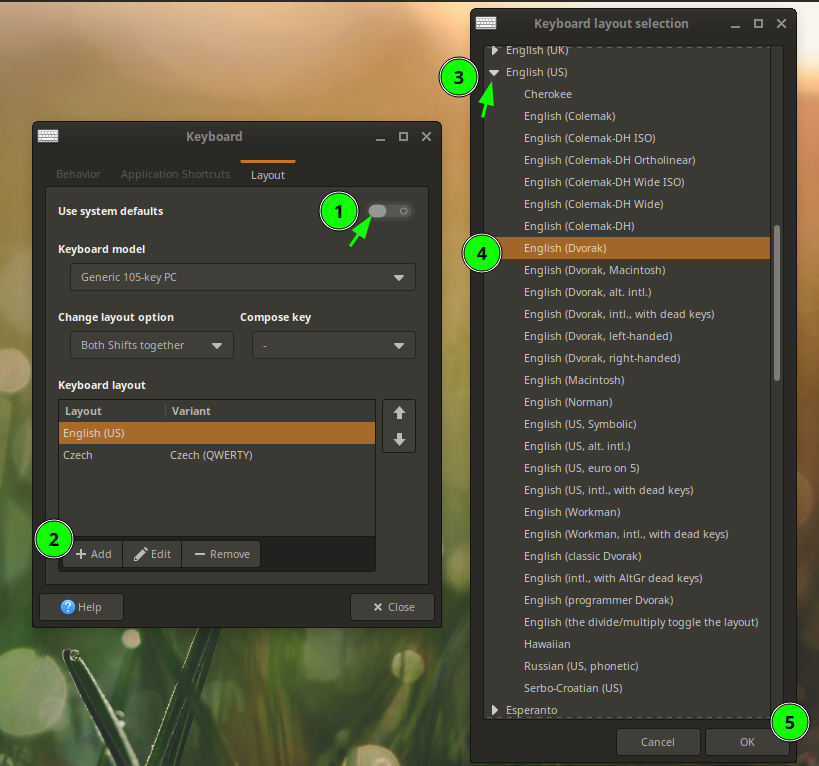
Last edited by k3dAR (2025-01-23 16:32:09)
Offline
#5 2025-01-23 21:32:34
- ethan0l
- Member
- Registered: 2025-01-20
- Posts: 5
Re: [SOLVED] How to change layout for xfce-session?
in Layout tab, when you click to Add button, then you see list of main layouts, if layout have variants, then before name is little arrow, this expand list of variants ;-)
Nooo,  I did it already and have dvorak layout right now, but when I first boot up my computer I have qwerty
Offline
#6 2025-01-23 21:45:41
- PackRat
- Member
- Registered: 2024-09-24
- Posts: 42

Re: [SOLVED] How to change layout for xfce-session?
You can change the system keyboard settings from the command line with setxkbmap. Something like this -
http://xahlee.info/linux/linux_switch_k … ayout.html
scroll down past the lxde section.
There may be some minor variations between distros. Debian/Ubuntu-based make have dpkg-reconfigure to let you make the change. Research that to be sure.
Last edited by PackRat (2025-01-23 21:47:30)
Offline
#7 2025-01-24 14:38:36
- ethan0l
- Member
- Registered: 2025-01-20
- Posts: 5
Re: [SOLVED] How to change layout for xfce-session?
You can change the system keyboard settings from the command line with setxkbmap. Something like this -
http://xahlee.info/linux/linux_switch_k … ayout.html
scroll down past the lxde section.
There may be some minor variations between distros. Debian/Ubuntu-based make have dpkg-reconfigure to let you make the change. Research that to be sure.
okay, I can change layout, but only for current session. When I say "session" I mean this first screen, when we write our password. But all settings with setxkbmap or other is works! But when I trying to first log in I have not my favorite layout. But after I wrote password I have right layout for my desktop and etc. Sorry for my bad explanation of problem
Offline
#8 2025-01-24 15:30:47
- eriefisher
- Wanderer
- From: ON, Canada
- Registered: 2008-10-25
- Posts: 1,026
- Website

Re: [SOLVED] How to change layout for xfce-session?
sudo dpkg-reconfigure keyboard-configurationmore info
https://www.baeldung.com/linux/console- … ard-layout
But it's all right, when you're all in pain and you feel the rain come down
It's alright, when you find your way, then you see it disappear
It's alright....
Chris Cornell
Offline
#9 2025-01-24 18:21:05
- k3dAR
- Member
- From: Czech Republic
- Registered: 2022-07-27
- Posts: 112
Re: [SOLVED] How to change layout for xfce-session?
[...] I mean this first screen, when we write our password [...]
if for "login screen" you use lightdm (*) you can set kbd for it in /etc/lightdm/lightdm.conf in/under [Seat:*] section add line:
display-setup-script = setxkbmap code_for_your_dvorak_kbd*) if you don't know, you can show what dm you use by:
systemctl status display-manager | head -n1Offline
#10 2025-01-25 07:32:17
- ethan0l
- Member
- Registered: 2025-01-20
- Posts: 5
Re: [SOLVED] How to change layout for xfce-session?
sudo dpkg-reconfigure keyboard-configurationmore info
https://www.baeldung.com/linux/console- … ard-layout
I use voidlinux, so all methods related to systemd is unusable, I think.
Added later 04 min 13 s:
ethan0l wrote:[...] I mean this first screen, when we write our password [...]
if for "login screen" you use lightdm (*) you can set kbd for it in /etc/lightdm/lightdm.conf in/under [Seat:*] section add line:
display-setup-script = setxkbmap code_for_your_dvorak_kbd*) if you don't know, you can show what dm you use by:
systemctl status display-manager | head -n1
Thank you! This method is worked for me!
Offline
Pages: 1
- Registered users online in this topic: 0, guests: 1
- [Bot] ClaudeBot
[ Generated in 0.015 seconds, 7 queries executed - Memory usage: 555.48 KiB (Peak: 572.9 KiB) ]