You are not logged in.
- Topics: Active | Unanswered
Pages: 1
#1 2025-05-20 20:21:43
- Boohoo
- Member
- Registered: 2025-05-20
- Posts: 4


Tray and desktop icons show as symbolic
I'm running Manjaro with XFCE and I’ve been struggling with an icon rendering issue that I can't seem to resolve.
The problem:
No matter what icon theme I choose (Papirus, Tela, etc.), tray icons and some desktop/launcher icons always appear as white symbolic icons. This happens even with well-maintained, complete themes like Papirus, which should show colorful icons by default.
This affects:
-System tray (e.g. network, Dropbox, Redshift, etc.)
-Desktop icons (e.g. Home, Trash)
-Thunar icons and launchers
What I’ve tried:
-Reinstalled GTK and icon-related packages (gtk3, gdk-pixbuf2, shared-mime-info, etc.)
-Rebuilt icon caches and mime databases
-Tested with a brand new user account (same issue)
-Used Timeshift to restore the system (no change)
-Created proper fallback chains in index.theme
-Tried multiple icon themes (Papirus, Tela, Qogir, Obsidian)
-Ensured symbolic overrides weren’t forced via .xprofile or settings.ini
Is there a known issue or a configuration that forces XFCE or GTK to prefer symbolic icons?
Or is there a better way to completely override this fallback behavior?
Thanks in advance — I’ve gone through a lot of trial and error and would really appreciate any insight.
Offline
#2 2025-05-20 20:40:14
- eriefisher
- Wanderer
- From: ON, Canada
- Registered: 2008-10-25
- Posts: 1,025
- Website


Re: Tray and desktop icons show as symbolic
In the system tray settings there is an option to request symbolic icon if selected. I don't use desktop icon so I'm not sure there.
But it's all right, when you're all in pain and you feel the rain come down
It's alright, when you find your way, then you see it disappear
It's alright....
Chris Cornell
Offline
#3 2025-05-21 05:55:23
- Boohoo
- Member
- Registered: 2025-05-20
- Posts: 4
Re: Tray and desktop icons show as symbolic
I did not realize that but I just checked and it is not marked. Anyway my issue is not only affecting the system tray, it is affecting desktop icons and thunar icons too
Offline
#4 2025-05-21 11:46:06
- ToZ
- Administrator
- From: Canada
- Registered: 2011-06-02
- Posts: 12,692

Re: Tray and desktop icons show as symbolic
Can you post images of the issues?
There is also a system-wide override in /etc/gtk-3.0 that you should check.
Thunar also has a "Use symbolic icons" option in Edit > Preferences > Side Pane.
Systray icons will only display what the app sends.
Also try with the fallback icon theme to see if there is a change:
xfconf-query -c xsettings -p /Net/IconThemeName -s ""Last edited by ToZ (2025-05-21 11:49:29)
Mark solved threads as [SOLVED] to make it easier for others to find solutions.
--- How To Ask For Help | FAQ | Developer Wiki | Community | Contribute ---
Offline
#5 2025-05-21 19:26:59
- Boohoo
- Member
- Registered: 2025-05-20
- Posts: 4
Re: Tray and desktop icons show as symbolic
I did not find anything about icons in /etc/gtk-3.0. there was only a file called im-multipress.conf.
I checked Edit > Preferences > Side Pane the "use symbolic folder icons" it is not ticked.
If I run xfconf-query -c xsettings -p /Net/IconThemeName -s "" I get a broken icon theme
Here’s what I see i status tray after running the fallback command:
This is status tray with elementary set: 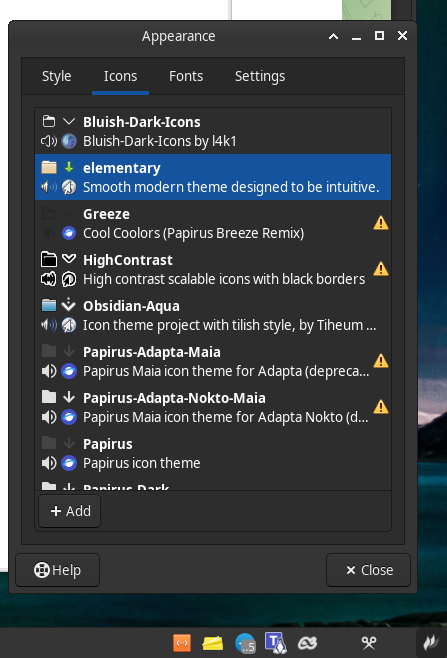
This is using High contrast: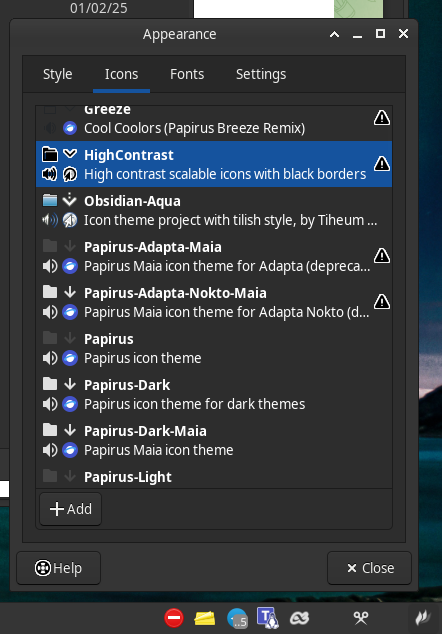
Last edited by Boohoo (2025-05-21 19:28:04)
Offline
#6 2025-05-22 09:49:12
- ToZ
- Administrator
- From: Canada
- Registered: 2011-06-02
- Posts: 12,692
Re: Tray and desktop icons show as symbolic
I was curious more about the issue with the desktop and thunar.
With respect to "systray icons", it will use whatever icon the application serves up - Xfce can't control this. You might have more flexibility with "Status Notifiers". What does the following return?
xfconf-query -c xfce4-panel -lvMark solved threads as [SOLVED] to make it easier for others to find solutions.
--- How To Ask For Help | FAQ | Developer Wiki | Community | Contribute ---
Offline
#7 2025-05-22 11:59:53
- Boohoo
- Member
- Registered: 2025-05-20
- Posts: 4
Re: Tray and desktop icons show as symbolic
That returns the following:
/configver                                     2
/panels                                        [1,2,3]
/panels/dark-mode                              true
/panels/panel-1/icon-size                      44
/panels/panel-1/length                         100
/panels/panel-1/plugin-ids                     [13,2,3,6,7]
/panels/panel-1/position                       p=8;x=960;y=1066
/panels/panel-1/position-locked                true
/panels/panel-1/size                           31
/panels/panel-2/plugin-ids                     [11,12,14]
/panels/panel-2/position                       p=4;x=3744;y=1055
/panels/panel-2/position-locked                true
/panels/panel-2/size                           48
/panels/panel-3/plugin-ids                     [15]
/panels/panel-3/position                       p=8;x=2016;y=1051
/panels/panel-3/position-locked                true
/panels/panel-3/size                           31
/plugins/notes/global/version                  1.11.2
/plugins/plugin-11                             clock
/plugins/plugin-11/digital-date-format         %A, %d %b
/plugins/plugin-11/digital-layout              1
/plugins/plugin-12                             weather
/plugins/plugin-12/cache-max-age               172800
/plugins/plugin-12/forecast/days               5
/plugins/plugin-12/forecast/layout             1
/plugins/plugin-12/location/latitude           xxx
/plugins/plugin-12/location/longitude          yyy
/plugins/plugin-12/location/name               Carrer
/plugins/plugin-12/msl                         31
/plugins/plugin-12/offset                      +02:00
/plugins/plugin-12/power-saving                true
/plugins/plugin-12/round                       true
/plugins/plugin-12/scrollbox/animate           true
/plugins/plugin-12/scrollbox/color             rgba(0,0,0,0)
/plugins/plugin-12/scrollbox/lines             1
/plugins/plugin-12/scrollbox/show              true
/plugins/plugin-12/scrollbox/use-color         false
/plugins/plugin-12/single-row                  true
/plugins/plugin-12/theme-dir                   /usr/share/xfce4/weather/icons/liquid
/plugins/plugin-12/timezone                    Europe/Madrid
/plugins/plugin-12/tooltip-style               1
/plugins/plugin-12/units/altitude              0
/plugins/plugin-12/units/apparent-temperature  2
/plugins/plugin-12/units/precipitation         0
/plugins/plugin-12/units/pressure              0
/plugins/plugin-12/units/temperature           0
/plugins/plugin-12/units/windspeed             0
/plugins/plugin-13                             whiskermenu
/plugins/plugin-13/button-icon                 distributor-logo-manjaro
/plugins/plugin-13/recent                      [xfce-wm-settings.desktop,xfce-wmtweaks-settings.desktop,xfce-keyboard-settings.desktop,xfce-settings-manager.desktop,xfce4-settings-editor.desktop,org.pulseaudio.pavucontrol.desktop,dropbox.desktop,brave-browser.desktop,appimagekit_ca562d0706298dfa907e80ebe5401495-Espanso.desktop,xfce-ui-settings.desktop]
/plugins/plugin-14                             actions
/plugins/plugin-14/appearance                  1
/plugins/plugin-14/button-title                0
/plugins/plugin-14/items                       [+lock-screen,-switch-user,+separator,-suspend,-hibernate,-hybrid-sleep,-separator,+shutdown,-restart,+separator,-logout,-logout-dialog]
/plugins/plugin-15                             tasklist
/plugins/plugin-15/include-all-monitors        false
/plugins/plugin-15/show-only-minimized         false
/plugins/plugin-2                              tasklist
/plugins/plugin-2/grouping                     true
/plugins/plugin-2/include-all-monitors         false
/plugins/plugin-2/show-handle                  false
/plugins/plugin-2/show-labels                  true
/plugins/plugin-2/show-only-minimized          false
/plugins/plugin-2/show-tooltips                true
/plugins/plugin-2/sort-order                   2
/plugins/plugin-2/window-scrolling             false
/plugins/plugin-3                              separator
/plugins/plugin-3/expand                       true
/plugins/plugin-3/style                        0
/plugins/plugin-6                              systray
/plugins/plugin-6/hidden-items                 []
/plugins/plugin-6/known-items                  [dropbox-client-9478,TelegramDesktop,chrome_status_icon_1,albert,dropbox-client-7,CopyQ_copyq,redshift,flameshot]
/plugins/plugin-6/known-legacy-items           [xfce terminal,clipman,pamac-tray,networkmanager applet,flameshot,redshift-gtk,notes,ethernet network connection “wired connection 1” active]
/plugins/plugin-6/square-icons                 true
/plugins/plugin-7                              separator
/plugins/plugin-7/style                        0
I did a TTY reset and I managed to find a icon theme that works, perhaps not my favorite but hey. The issue I still am struggling with is that all windows and the panel get this dark brown color no matter what style I chose.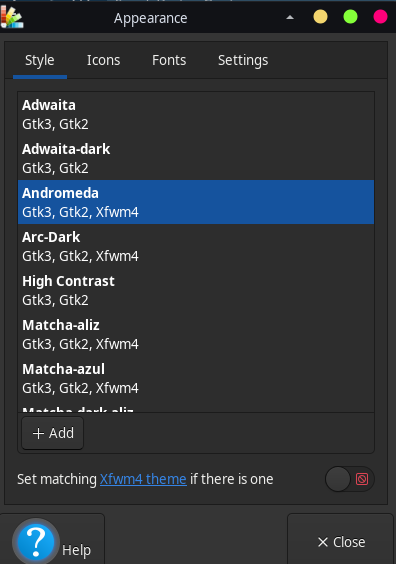
Added later 2 h 51 min 30 s:
I finally managed. .xprofile had this:
export GTK_ICON_THEME=Obsidian-Aqua
export GTK_THEME=Adwaita:dark
export XDG_CURRENT_DESKTOP=XFCE so I put an # in front of export GTK_ICON_THEME=Obsidian-Aqua
So whatever I changed had no effect. Also the Obsidian theme was broken, but I am on the right path now.
Offline
Pages: 1
- Registered users online in this topic: 0, guests: 1
- [Bot] ClaudeBot
[ Generated in 0.015 seconds, 7 queries executed - Memory usage: 569.87 KiB (Peak: 587.28 KiB) ]