You are not logged in.
- Topics: Active | Unanswered
#1 2026-04-10 20:47:26
- Jeandré du Toit
- Member
- Registered: 2011-12-18
- Posts: 4


[SOLVED possibly in 4.19] whiskermenu-button, how to remove borders?
I tried changing the margin values in /.config/gtk-3.0/gtk.css and was successful in getting rid of the left margin with "margin-left: -7px;", but I can't get rid of the top and bottom margins.
#whiskermenu-button {
background-color: #ffff00;
margin-top: -7px;
margin-bottom: -7px;
margin-left: -7px;
}
Also tried "0px" for: margin, border-spacing, border-top, border-top-width, border-width, padding.
Panel Preferences, Appearance, Icons, Adjust size automatically = true (fixed icon sizes still leave at least 1 pixel border).
xfce4-panel 4.18.4
xfce4-whiskermenu-plugin 2.8.3
Linux Mint 22.3 - Xfce 64-bit
Edit: +"[SOLVED possibly in 4.19]"
Last edited by Jeandré du Toit (2026-04-11 12:09:14)
Offline
#2 2026-04-10 22:15:04
- ToZ
- Administrator
- From: Canada
- Registered: 2011-06-02
- Posts: 12,723

Re: [SOLVED possibly in 4.19] whiskermenu-button, how to remove borders?
What GTK (Appearance) theme are you using? Can you post a picture of your whiskermenu-button?
Which "border" are you trying to remove?
Mark solved threads as [SOLVED] to make it easier for others to find solutions.
--- How To Ask For Help | FAQ | Developer Wiki | Community | Contribute ---
Offline
#3 2026-04-11 06:55:09
- Jeandré du Toit
- Member
- Registered: 2011-12-18
- Posts: 4
Re: [SOLVED possibly in 4.19] whiskermenu-button, how to remove borders?
What GTK (Appearance) theme are you using?
Mint 22.3 Settings Manager, Appearance, Theme:
Mint-Y-Dark-Blue (Gtk3, Gtk2, Xfwm4) with "Set matching Xfwm4 theme if there is one" = true.
Mint 22.3 Settings Manager, Window Manager, Style:
custom theme I edited, called "Windows10BlueRedThick6" which I don't think affects the panel.
Can you post a picture of your whiskermenu-button?
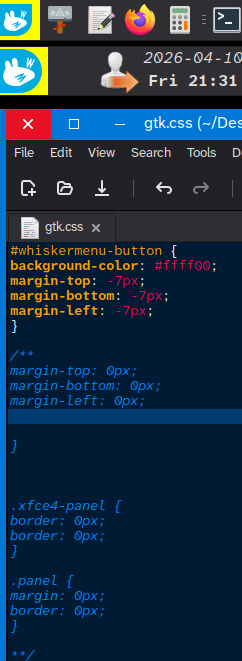
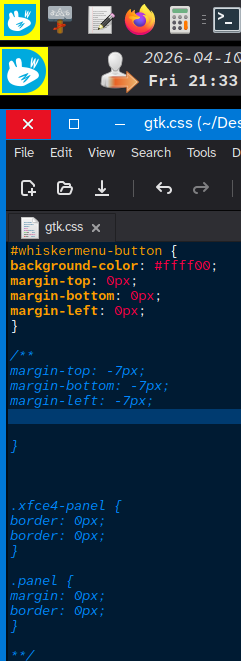
Which "border" are you trying to remove?
In the screenshots, it's the yellow bits at the top, left, and bottom of the blue+white Wiskermenu button.
(
I've seen that when some people click on the menu button they aim exactly for the circular icon, so I've edited the icon to be flush to the edge(s) of the screen, and in order to take advantage of https://en.wikipedia.org/wiki/Fitts's_law I'd like to get rid of the visual (doesn't affect clicking) borders between the icon and the screen edge(s) so they intuitively know they can just move their cursor to the edge/corner.
)
Edit: typo: wm
Last edited by Jeandré du Toit (2026-04-11 07:20:59)
Offline
#4 2026-04-11 11:20:51
- ToZ
- Administrator
- From: Canada
- Registered: 2011-06-02
- Posts: 12,723
Re: [SOLVED possibly in 4.19] whiskermenu-button, how to remove borders?
I don't think its directly possible in 4.18. There was a border-width option added in 4.19 that looks like addresses this issue.
The only other way would be to increase the size of the icon, but that adds blurriness:
#whiskermenu-button image {-gtk-icon-transform: scale(1.2);}Mark solved threads as [SOLVED] to make it easier for others to find solutions.
--- How To Ask For Help | FAQ | Developer Wiki | Community | Contribute ---
Offline
#5 2026-04-11 12:06:10
- Jeandré du Toit
- Member
- Registered: 2011-12-18
- Posts: 4
Re: [SOLVED possibly in 4.19] whiskermenu-button, how to remove borders?
Many thanks ToZ.
I'll wait for Mint to upgrade to 4.20, since the next distros I want to try don't have it yet; and then I'll try again.
Offline
- Registered users online in this topic: 0, guests: 1
- [Bot] ClaudeBot
[ Generated in 0.009 seconds, 7 queries executed - Memory usage: 562.57 KiB (Peak: 563.96 KiB) ]