You are not logged in.
- Topics: Active | Unanswered
Pages: 1
#1 2026-05-03 05:10:22
- aalbani
- Member
- Registered: 2023-03-30
- Posts: 53


Whisker menu strange behavior
The whisker menu doesn't accept an icon theme. Everything else works correctly.
Offline
#2 2026-05-03 09:27:31
- ToZ
- Administrator
- From: Canada
- Registered: 2011-06-02
- Posts: 12,672

Re: Whisker menu strange behavior
Can you explain more what you mean?
Mark solved threads as [SOLVED] to make it easier for others to find solutions.
--- How To Ask For Help | FAQ | Developer Wiki | Community | Contribute ---
Offline
#3 2026-05-03 10:33:06
- aalbani
- Member
- Registered: 2023-03-30
- Posts: 53
Re: Whisker menu strange behavior
The whisker menu has some symbol theme. I've now changed the global symbol theme in the XFCE settings, which works fine. However, the whisker menu still has the old symbol theme; it's not adopting the changed symbol theme, unlike in previous installations.
Offline
#4 2026-05-03 12:55:39
- ToZ
- Administrator
- From: Canada
- Registered: 2011-06-02
- Posts: 12,672
Re: Whisker menu strange behavior
Is it all icons in whiskermenu, or just the whiskermenu icon on the panel? Any chance you can post a screenshot?
Mark solved threads as [SOLVED] to make it easier for others to find solutions.
--- How To Ask For Help | FAQ | Developer Wiki | Community | Contribute ---
Offline
#5 2026-05-03 13:24:48
- aalbani
- Member
- Registered: 2023-03-30
- Posts: 53
Re: Whisker menu strange behavior
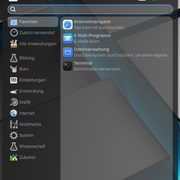
According to the icon theme, these should be symbolic icons.
Offline
#6 2026-05-03 13:57:09
- ToZ
- Administrator
- From: Canada
- Registered: 2011-06-02
- Posts: 12,672
Re: Whisker menu strange behavior
Which icon theme is this? Does this icon theme include symbolic icons for the icons that are not symbolic now?
Try opening the applications menu (if enabled, right-clicking on the desktop you can see it under "Applications") or add the applicationsmenu to the panel. Are the icons there all symbolic?
Mark solved threads as [SOLVED] to make it easier for others to find solutions.
--- How To Ask For Help | FAQ | Developer Wiki | Community | Contribute ---
Offline
#7 2026-05-03 14:22:44
- aalbani
- Member
- Registered: 2023-03-30
- Posts: 53
Re: Whisker menu strange behavior
I'm using the Mactahoe icon theme by Vinceliuice. But no matter which icon theme I use, the Whisker Menu doesn't change.
Offline
#8 2026-05-03 17:08:50
- ToZ
- Administrator
- From: Canada
- Registered: 2011-06-02
- Posts: 12,672
Re: Whisker menu strange behavior
Does the applicationsmenu show the same icons, or different icons?
Do you have a ~/.config/gtk-3.0/settings.ini file? If so, can you post it's contents?
Mark solved threads as [SOLVED] to make it easier for others to find solutions.
--- How To Ask For Help | FAQ | Developer Wiki | Community | Contribute ---
Offline
#9 2026-05-03 17:20:02
- aalbani
- Member
- Registered: 2023-03-30
- Posts: 53
Re: Whisker menu strange behavior
The icons are different; unfortunately, I don't know which theme the menu uses.
And no, I don't have a settings.ini file.
Offline
#10 2026-05-03 17:45:58
- ToZ
- Administrator
- From: Canada
- Registered: 2011-06-02
- Posts: 12,672
Re: Whisker menu strange behavior
I don't know which theme the menu uses.
It would use the icon theme that you selected - in this case Mactahoe icon theme. Are these icons correct?
The MacTahoe icon theme doesn't appear to create symbolic icons for the apps, as you can see in the screenshot at that site.
From your screenshot, I see 3 different areas of icons: the categories at the side, the app icons in the middle, and the settings icons at the top. It would appear that the icon theme is missing some of the category symbolic icons and doesn't include any for apps and the settings at the top. If you look at the icon theme's issues list (open and closed issues), you can see where specific icons requests are being made and accommodated.
If you are looking for an icon theme that provides ALL icons as symbolic icons, you may need to look for another icon theme. Since this theme is made up or svg icon files, you could try adding:
#whiskermenu-window * {-gtk-icon-style: symbolic}...to ~/.config/gtk-3.0/gtk.css to see if it helps. It should force the use of symbolic icons but only if a symbolic version of that icon exists.
Last edited by ToZ (2026-05-03 17:49:38)
Mark solved threads as [SOLVED] to make it easier for others to find solutions.
--- How To Ask For Help | FAQ | Developer Wiki | Community | Contribute ---
Offline
Pages: 1
- Registered users online in this topic: 0, guests: 1
- [Bot] ClaudeBot
[ Generated in 0.013 seconds, 7 queries executed - Memory usage: 552.08 KiB (Peak: 569.05 KiB) ]