You are not logged in.
- Topics: Active | Unanswered
#1 2026-06-10 02:30:35
- Sly_Mk3
- Member
- Registered: 2026-06-08
- Posts: 8


[SOLVED] Revert 4.18 panel behaviour to xfce-version of Xubuntu 20.04
UPDATE:
Not all issues could be solved using CSS (for now):
All Window Buttons related issues mentioned here seem to be because things got hardcoded and would require a fix on the maintainer's end or a user patch.
For the rest, solutions are listed in the discussion below.
There's not much more to investigate, so this thread is marked as solved (albeit strictly seen: partially solved).
I will still update it in case any of the mentioned things get addressed so people can find out if they can solve the issue by upgrading to a newer xfce version.
Great thanks to ToZ and also to anyone else who has made useful suggestions in other places on the web!
About 2 weeks ago, I tried to get help on Reddit to revert the behaviour of the xfce4-panel in xfce4.18 to behave like in xfce4.14 (iirc that was the version Xubuntu 20.04 used).
Relevant beforehand:
Currently, I'm on Xubuntu 24.04 LTS.
I used the upgrade path from a fresh 20.04 install, to 22.04, and then to 24.04, which was a rocky start.
Because of this I checked against a fresh 24.04 in VirtualBox and all behaviour I experience is identical to it.
On an Android device I run xfce through Termux-X11, which is xfce4.20. Behaviour is same as the one I observed in 4.18, so the below things seem to be deliberate changes I figure.
These 4.18-introduced(?) changes are the first in my time of using xfce which actively hinder my workflow, also because of how used I got to the old ways.
Sorry in advance as the below list is much, but after careful observation and consideration, since the majority of my issues are likely tied to the Window Buttons panel plugin I rather keep this all in one thread than to clutter the forum.
The following things are changes which I want to revert, and I looked all over the net in the hopes for answers and failed to find any:
Unfocused changed windows and groups acquired background image despite flat buttons being on (merely visual nitpick);
Inactive window groups have a highlighted background now, even if flat window buttons is on in the Window Buttons panel plugin, it resets when turning it on again but this behaviour returns with use.
→ Partially managed to solve via somewhat messy lengthy css (gtk.css, I can post the code on demand, don't want to clutter atm). However, I now fail to disable hover- and deselect-fadeout animations. The new feautres(?) of the highlight of changed windows and group windows causes a fade animation to exist while other panel entries do not have it. Help appreciated on enforcing uniform behaviour via gtk.css.
̣Right click mouseover raises grouped window entries (highly bothersome):
If I click on it and move my cursor over individual group entries, they get auto-raised, which seriously messes up the order of opened windows.
I would like to disable this behaviour as it covers up windows I may want to see contents of. Well-intended change, but not desired in my uses.
̣Group entries order has been inverted (very bothersome):
Previously, oldest item was on bottom, newest on top. This is no more the case and after all these years, it will be hard to unlearn this muscle memory and feels quite unintuitive.
It would be easier to reverse the order back to what it used to be than forcing oneself to get used to it. Sadly, I found no setting for this in any docs or just fail at searching.
Arguably, it makes sense to order it that way with the existence of the Launch New Instance menu option at the bottom, but I would rather have it all flipped in order (+ see point 5).
̣Currently focused group entry is now italic (bothersome):
This is now highlighted as both, bold and italic. Sadly this isn't easy to read for me, in general readability lf italic fonds is worse for me.
I tried to inspect the right click context menu with GTK+Inspector, but unlike Firefox's browser toolbox, I see no way to freeze context menus to prevent them from auto-closing and so I'm unable to even analyse what's going on in there. All I can see is that the background, csd and popup style classes are used.
̣"New" right click context menu option on Window Bottons: Launch New Instance.
How can I remove it? It's redundant for my everyday use and needlessly taking up space. There's surely use for it, but it's just not needed for me and increases accidental misclicks. It's no big issue if it needs to stay though, the other stuff is more pressing.
̣Label-wrapping " [ ] "-brackets of minimised windows are gone (nice-to-have):
On older xfce versions, if you minimized a window, the Window Button plugin wrapped the label in [ ], i.e. Firefox would become [ Firefox ] which was easy to identify on low screen brightness – and even made opacity changes obsolete.
I numbered this list for convenience reasons so it will be easier to talk about stuff without explicitly repeating everything or wondering what it's about , i.e. "to tackle point 3, look at X / do Y / consider Z".
For overview reasons, here's a screenshot (same as the one on Reddit):
Here you can see:
1) Thunar as an example of the weird buggy-seeming group highlight background "which shouldn't exist" – [partially solved],
3) inverted group order (Startpage Search Results is the latest window, the blank Firefox private browsing session tab the oldest window),
4) currently raised/focused window title in italic + bold in group dropdown,
5) Launch New Instance menu entry, and
6) lack of [ ] wrapping of minimised applications, examples here are LMMS, Parole Media Player and Terminal.
2 can only be showcased if I were to record a video.
Any help will be greatly appreciated!
PS: I will update the (don't worry, I will share results on Reddit once I got the bare essentails done or have my answers – this includes "no, not possible"-answers).
Last edited by Sly_Mk3 (2026-07-23 17:33:33)
– Sly.
Offline
#2 2026-06-10 23:31:12
- ToZ
- Administrator
- From: Canada
- Registered: 2011-06-02
- Posts: 12,681

Re: [SOLVED] Revert 4.18 panel behaviour to xfce-version of Xubuntu 20.04
6) lack of [ ] wrapping of minimised applications, examples here are LMMS, Parole Media Player and Terminal.
See: https://gitlab.xfce.org/xfce/xfce4-pane … 7221adee3e. To re-enable:
xfconf-query -c xfce4-panel -p "$(xfconf-query -c xfce4-panel -lv | grep tasklist | awk '{print $1}')/label-decorations" -t bool -s false --create5) Launch New Instance menu entry
See: https://gitlab.xfce.org/xfce/xfce4-pane … _items/782. Workaround is listed there.
4) currently raised/focused window title in italic + bold in group dropdown,
.tasklist label {font-style: normal}Will work on others later when I have time.
Added later 09 min 40 s:
3) Group entries order has been inverted (very bothersome)
Looks like it was changed here. You might need to create a bug/enhancement request if you want it changed as it appears to be hard-coded.
Added later 21 min 02 s:
2) Right click mouseover raises grouped window entries (highly bothersome)
This seems to be the current behaviour now. You might want to create a bug/regression report if it didn't work this way before.
Added later 24 min 06 s:
1) Unfocused changed windows and groups acquired background image
Can you tell me what GTK appearance theme you are using and can you post the css you are using?
Mark solved threads as [SOLVED] to make it easier for others to find solutions.
--- How To Ask For Help | FAQ | Developer Wiki | Community | Contribute ---
Offline
#3 2026-06-11 10:21:14
- Sly_Mk3
- Member
- Registered: 2026-06-08
- Posts: 8
Re: [SOLVED] Revert 4.18 panel behaviour to xfce-version of Xubuntu 20.04
As this post is massive, I collapsed each subtopic in a spoiler for readability purposes.
6) [SUFFICIENTLY SOLVED] Re-enable [ ]-wrapping minimized window titles
5) [CLOSE TO SOLUTION] Remove Launch New Instance context menu option
3) [THOUGHTS] Window list in window group has been inverted
4) [CLOSE TO SOLUTION] Force normal font-style on all labels in right-click grouped windows context menu list
2) [ANSWERED] Auto-raising of grouped window list entries when hovering over them in right click context menu
&
1) [SOLVED] Background gradients show up despite flat buttons being on

Sorry for the wall of text, I don't want to forget anything for the issue, so I rather typed it all down… also to figure out if this is really not just a me-thing.
Would appreciate someone testing my above claims with the Thunar-example in the block of the solved 1).
I'm slowly wondering if it wouldn't be possible to regress just the Window Buttons plugin itself to use the 4.14 version in 4.18, but I'm unsure if this is even remotely possible given how this is not an external plugin but part of the panel… no idea how closely knit these are.
Any idea if it's worth it to sink time into that?
I would be willing to go the lengths to compile from source, but it's possible I may need some assistance here and there if running into issues, especially if it has some quirky dependencies. I don't do this all too often (with C stuff), and had 0 contact with using meson yet.
To me, in theory, it sounds like it would solve all issues I have with this plugin (maybe even including the automatic mouseover window raising in the rightclick context menu of a group-button if it is handled by it?).
If not, I'll have to disable groups and sit this one out until a change is introduced to use it in (probably) 28.04 at the earliest.
If there's alternative external plugins which do the same as Window Buttons, I would be highly interested in trying those as a temporary workaround.
On another note:
I opened the .xsession-errors file in Mousepad as a debugging help to see which styles are recognised and which are seen as an error.
Could be a huge help to suggest to others who may struggle with something like I do (for those reading along, you may have to enable hidden elements in Thunar, it's directly in /home/yourusername/ but not listed due to its .-prefix).
PS: You won't believe how incredibly thankful I am for your quick reply and help! I really appreciate it and you already advanced my matter to a significant degree! 
Last edited by Sly_Mk3 (2026-06-11 10:25:05)
– Sly.
Offline
#4 2026-06-11 20:01:45
- ToZ
- Administrator
- From: Canada
- Registered: 2011-06-02
- Posts: 12,681
Re: [SOLVED] Revert 4.18 panel behaviour to xfce-version of Xubuntu 20.04
#5 - the best solution will be to post in the existing bug/enhancement report with your encouragement to provide an option to enable/disable the setting, so no funky workarounds are needed.
#3 - Gtk CSS is similar to but not the same as regular CSS - or the CSS that firefox uses. I've never seen that sort of notation in Gtk CSS. See: https://docs.gtk.org/gtk3/css-overview.html and https://docs.gtk.org/gtk3/css-properties.html.
#4 - I agree that its frustrating that we can't get access to all of the elements. That tweak seems to work for me though. 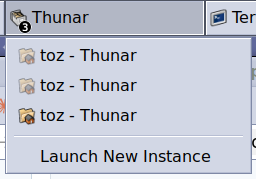
I'm slowly wondering if it wouldn't be possible to regress just the Window Buttons plugin itself to use the 4.14 version in 4.18
That won't be possible. Too many of the supporting libraries have changed and older functions deprecated.
I would be willing to go the lengths to compile from source,
If you are willing and able to do so, this might be an option. You could also propose merge requests to fix some of these issues so they can be available in the master branch for other users. The meson stuff is basically some scripts that you probably won't have to touch if you're just enhancing existing functionality. Knowledge of C would be important.
PS: You won't believe how incredibly thankful I am for your quick reply and help! I really appreciate it and you already advanced my matter to a significant degree! big_smile
Glad I could help.
Mark solved threads as [SOLVED] to make it easier for others to find solutions.
--- How To Ask For Help | FAQ | Developer Wiki | Community | Contribute ---
Offline
#5 2026-06-12 00:01:33
- Sly_Mk3
- Member
- Registered: 2026-06-08
- Posts: 8
Re: [SOLVED] Revert 4.18 panel behaviour to xfce-version of Xubuntu 20.04
Regarding 4):
When I tested this, the first click into the group was indeed as expected: no italic.
Any subsequent window switching within the group reintroduced it. It seems this only applies initially when the window gets spawned or something like that…? Afterwards something else seems to overwrite it.
Did you try what happens if you switch between your Thunar instances to change focus from window to window?
Open the context menu, at first it should look fine. Then click on an entry, and then open it again. That's when the css fails for me.
Which is the css you're using to get rid of it if it works reliably?
Is it:
.tasklist label { font-style: normal; }…(with semicolon), or a different one?
Or do you have other lines that might be relevant to the tasklist, label, or csd?
I made a clean gtk.css with just this inside and it does nothing. Tried other variants as well, same behaviour.
– Sly.
Offline
#6 2026-06-12 01:26:46
- ToZ
- Administrator
- From: Canada
- Registered: 2011-06-02
- Posts: 12,681
Re: [SOLVED] Revert 4.18 panel behaviour to xfce-version of Xubuntu 20.04
Hmmm. I see what you mean. Focus changing among other windows is fine, but when the grouped application gets focus, it loses the CSS setting. I didn't test focus changing.
Here is where its set. I believe that markup like this takes priority over css, so your out of luck. The only option here would be to patch the source code and change "<b><i>%s</i></b>" to just "%s".
Here is a post of mine from 2021 showing how to patch xfce4-weather-plugin on ubuntu using their normal source patching processes. Not sure if this is still valid now, but it might be worth a test if you are looking to patch a few things. It's been a while since I've used (x)ubuntu as I'm on FreeBSD now.
Last edited by ToZ (2026-06-12 01:30:58)
Mark solved threads as [SOLVED] to make it easier for others to find solutions.
--- How To Ask For Help | FAQ | Developer Wiki | Community | Contribute ---
Offline
#7 2026-06-26 18:13:40
- Sly_Mk3
- Member
- Registered: 2026-06-08
- Posts: 8
Re: [SOLVED] Revert 4.18 panel behaviour to xfce-version of Xubuntu 20.04
I appreciate the resources linked!
Getting back to this, I'm currently debating what the best course of action would be to at least partially restore the tasklist behaviour.
The tl;dr is:
"Take the patch route, or risk to build 4.14's tasklist as an external panel plugin?"
My full train of thought is below.
For one I'm trying to find out where the group button dropdown sorting takes place, and if the automatic window rising when opening the context menu of a group with right click and hovering over entries is part of tasklist-widget.c. Finding those would make it easier to modify tasklist to my needs, although comparing 4.14 with 4.18 in split view, bluntly said that looks like a longer term investment and I got some trouble making these out. I'm not new to programming as a whole, but to xfce and C.
That's why I'm currently considering if what you helped me with, the Parole regression from today, can be applied to build the 4.14 version of tasklist – as a separate plugin under different name / identifier.
Or if I need to take the patch route (for which knowing what to edit would be key, and then correctly edit it, which could be a lengthy process too).
I did not encounter any bugs in daily use of 4.14's tasklist, while the current one has multiple quirks I would have to look out for with yet limited experience, so in my mind that regression sounded like "the easy way" in theory, which could probably help me get by until the things I report get tackled by someone. Though I suspect it won't be as easy as my mind makes it sound.
The problem is it seems like these plugins are truly part of xfce4-panel at a glance, to my understanding at least.
And I have no idea if I'm not going to dig an unreasonably deep hole trying to build an external legacy variant of just the tasklist and nothing else as I lack overview what tasklist depends on, and I suppose there are at the very least going to be similar package conflicts to Parole given the years that passed since. 
On another tangentialy related note:
4.20 has the same "symptoms" as 4.18 by the way.
I installed xfce on my new phone a while back and can observe the same quirks there.
UPDATE:
For now, the issues are deemed "solved", see OP for the exact reasoning.
Last edited by Sly_Mk3 (2026-07-23 18:46:11)
– Sly.
Offline
- Registered users online in this topic: 0, guests: 1
- [Bot] ClaudeBot
[ Generated in 0.037 seconds, 7 queries executed - Memory usage: 675.77 KiB (Peak: 717.18 KiB) ]