You are not logged in.
- Topics: Active | Unanswered
#1 2026-10-19 13:32:20
- gtubolcev
- Member
- Registered: 2026-10-19
- Posts: 2


Prototype: scheduled theme switching in Appearance settings
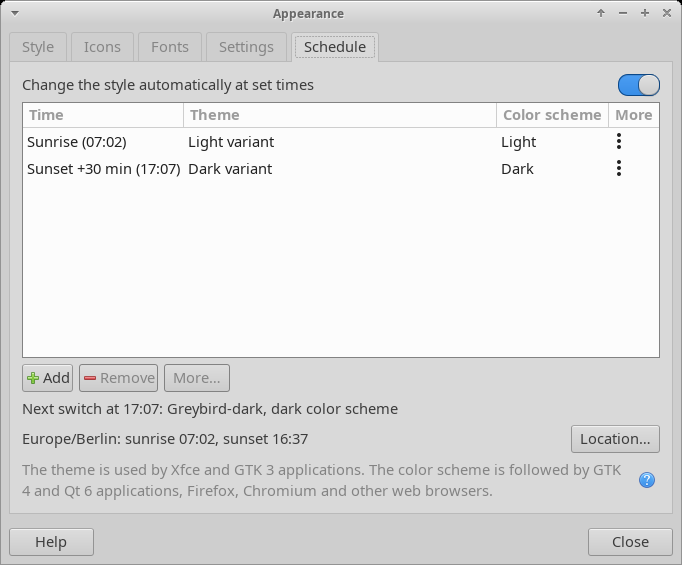
Prototype: scheduled theme switching in Appearance settings (Xfce 4.20)
Hi all,
I've built a prototype that adds a Schedule tab to
xfce4-appearance-settings. You can define any number of rules of the form "at HH:MM, switch the style". This is useful for an automatic dark mode in the evening and back to light in the morning.
Each rule can do any of these, together or separately:
Theme: switch to the dark or light variant of the theme that is active at that moment, or to a specific theme. Variants are found case-insensitively, e.g. Greybird → Greybird-dark, Orchis-Compact → Orchis-Dark-Compact.
Color scheme: set the dark/light preference that GTK 4/libadwaita, Qt 6, Firefox, Chromium and Electron apps read through the settings portal.
More: also set the matching xfwm4 theme (by default this follows the "Set matching Xfwm4 theme" option), the icon theme or the cursor theme, or run your own shell command.
The rules are stored in xfconf (
xsettings:/Xfce/ThemeSchedule/). xfsettingsd applies them, so they work without the dialog being open. A rule fires when the clock passes its time, so a manual change stays until the next rule. A switch missed while you were logged out is applied at login.
The code is a set of patches against xfce4-settings 4.20.1 (tested on Xubuntu 26.04), and GitHub Actions builds
.debpackages from them:
https://github.com/gtubolcev/xfce-patches
Sunrise/sunset-based rules are planned next. I'd welcome feedback on the UI and the approach.
A note on why this is not a merge request: I'm not a programmer, and the code was written with Claude (an AI assistant). I can test that it works on my machine, but I can't properly review the code myself, so I don't feel right submitting it upstream as-is. If a developer finds the idea useful and wants to review it or take it over, please feel free.
Offline
#2 2026-10-20 21:18:44
- CwF
- Moderator
- Registered: 2018-01-28
- Posts: 363

Re: Prototype: scheduled theme switching in Appearance settings
This is an interesting idea. It seems someone takes a stab at how to rotate themes every so often, an integrated tool as you've done is a nice touch.
Overall I have moved away from cycling themes and am currently working on using a single theme that can scale well with utilities like redshift or xsct.
I've already built a cron editor and parser with 7+2 panes for a long list of control events for anything and everything. Since an xsct schedule or even theme switching is easily accomplished with it, another separate scheduler is either good if tidy, or extra bloat if not. I'm not so excited at moving this to systemd.timers since they are not as straight forward as cron, and in my case unified into a master scheduler.
This approach of honest AI assistance is also appreciated, good luck with it.
Offline
#3 2026-10-24 10:10:20
- PaperNick
- Member
- Registered: 2013-05-26
- Posts: 109

Re: Prototype: scheduled theme switching in Appearance settings
That's a great idea! Good work!
Like @CwF, I've been using the default Greybird theme which has a good light/dark support. I've written a helper script for redshift-gtk that automatically switches to dark/light theme depending on the sunset/sunrise time for my location.
You need to place the theme-switch.sh script in ~/.config/redshift/hooks/ folder and make the script executable:
chmod +x ~/.config/redshift/hooks/theme-switcher.shtheme-switch.sh:
#!/bin/sh

# Note: make sure to enable AppArmor to read this script:
# https://github.com/jonls/redshift/issues/850#issuecomment-1430106510
#
# Location of AppArmor file: /etc/apparmor.d/usr.bin.redshift
# Add the following between the braces:
#  owner @{HOME}/.config/redshift.conf r,
#  owner @{HOME}/.config/redshift/** r,
#  owner @{HOME}/.config/redshift/hooks/** ux,
#
# Related issues:
# https://github.com/jonls/redshift/pull/149
# https://github.com/jonls/redshift/issues/858#issuecomment-1125324576
# https://github.com/jonls/redshift/issues/838


# Debug input params of this script:
# echo "Redshift params: \n $@" >> ~/Desktop/redshift-debug-params.txt

set_light_theme() {
    xfconf-query -c xsettings -p /Net/ThemeName -s Greybird
    xfconf-query -c xfwm4 -p /general/theme -s Greybird
    xfconf-query -c xfce4-panel -p /panels/dark-mode -s false
}

set_night_theme() {
    xfconf-query -c xsettings -p /Net/ThemeName -s Greybird-dark
    xfconf-query -c xfwm4 -p /general/theme -s Greybird-dark
    xfconf-query -c xfce4-panel -p /panels/dark-mode -s true
}

if [ "$1" = "period-changed" ]; then
    case "$3" in
        night)
            set_night_theme
            ;;
        transition)
            set_night_theme
            ;;
        daytime)
            set_light_theme
            ;;
    esac
fi
I've noticed that the default installation of redshift-gtk doesn't whitelist the "hooks" path in Xubuntu, so you need to manually edit the "apparmor" file for redshift-gtk:
sudo nano /etc/apparmor.d/usr.bin.redshiftThen you need to add those lines:
owner @{HOME}/.config/redshift.conf r,
owner @{HOME}/.config/redshift/** r,
owner @{HOME}/.config/redshift/hooks/** ux,
Here's how the complete file looks:
# ------------------------------------------------------------------
#
#    Copyright (C) 2015 Cameron Norman <camerontnorman@gmail.com>
#
#    This program is free software: you can redistribute it and/or modify
#    it under the terms of the GNU General Public License as published by
#    the Free Software Foundation, either version 3 of the License, or
#    (at your option) any later version.
#
#    This program is distributed in the hope that it will be useful,
#    but WITHOUT ANY WARRANTY; without even the implied warranty of
#    MERCHANTABILITY or FITNESS FOR A PARTICULAR PURPOSE.  See the
#    GNU General Public License for more details.
#
#    You should have received a copy of the GNU General Public License
#    along with this program.  If not, see <http://www.gnu.org/licenses/>.
#
# ------------------------------------------------------------------

#include <tunables/global>
/usr/bin/redshift {
  #include <abstractions/base>
  #include <abstractions/nameservice>
  #include <abstractions/dbus-strict>
  #include <abstractions/wayland>
  #include <abstractions/X>

  dbus send
       bus=system
       path=/org/freedesktop/GeoClue2/Client/[0-9]*,

  dbus receive
       bus=system
       path=/org/freedesktop/GeoClue2/Manager,

  # Allow but log any other dbus activity
  audit dbus bus=system,

  owner @{HOME}/.config/redshift.conf r,
  owner @{HOME}/.config/redshift/** r,
  owner @{HOME}/.config/redshift/hooks/** ux,
  owner /run/user/*/redshift-shared-* rw,

  # Site-specific additions and overrides. See local/README for details.
  #include <local/usr.bin.redshift>
}
After that reload the apparmor rules:
sudo systemctl reload apparmorNote, I'm using Xubuntu so the apparmor config might vary across distros.
Offline
#4 2026-10-27 18:09:36
- gtubolcev
- Member
- Registered: 2026-10-19
- Posts: 2
Re: Prototype: scheduled theme switching in Appearance settings
Some news:
1. New minor version 0.2.1
- Theme schedule rule can set screen brightness.
2. PPA for noble 24.04 and resolute 26.04 is here:
https://launchpad.net/~gtubolcev/+archi … ce-patches
Offline
#5 2026-10-30 08:13:43
- TimTom420
- Member
- Registered: 2026-03-26
- Posts: 1


Re: Prototype: scheduled theme switching in Appearance settings
That's a great idea! Good work!
Like @CwF, I've been using the default Greybird theme which has a good light/dark support. I've written a helper script for redshift-gtk that automatically switches to dark/light theme depending on the sunset/sunrise time for my location.
Great workaround. Utilizing Redshift hooks with xfconf-query is a reliable way to automate GTK and xfwm4 theme switches based on solar position without needing extra background daemons.
Offline
- Registered users online in this topic: 0, guests: 1
- [Bot] ClaudeBot
[ Generated in 0.021 seconds, 7 queries executed - Memory usage: 564.28 KiB (Peak: 581.67 KiB) ]