You are not logged in.
- Topics: Active | Unanswered
#1 2026-11-08 19:09:20
- zChris
- Member
- Registered: 2026-11-08
- Posts: 6


[SOLVED] Unable to theme background desktop labels
Hello!
I have been at this for some days now but i cannot figure it out. I know i am at the right place becouse other changes (changing font-family etc) works. But for some reason it ignores background-color.
In my theme that resides in ~/.themes/themename/gtk-3.0/gtk.css
i have among lots of otherthings
XfdesktopIconView {
-XfdesktopIconView-label-radius: 0;
background-color: #ffff00;
font-family: "Geneva";
border-radius: 0px;
text-shadow: none;
}
xfdesktop version 4.20.2, XFCE 4.20 Built for gtk+ 3.24.51 linked with gtk.24,52
What am i missing here?
Last edited by zChris (2026-11-10 20:34:37)
Offline
#2 2026-11-08 20:28:49
- CwF
- Moderator
- Registered: 2018-01-28
- Posts: 364


Re: [SOLVED] Unable to theme background desktop labels
Try more global
.view, iconview { background-color: #ffff00; }
Offline
#3 2026-11-08 21:40:31
- zChris
- Member
- Registered: 2026-11-08
- Posts: 6
Re: [SOLVED] Unable to theme background desktop labels
Sadly that didnt help.
here is my gtk.css file https://bpa.st/MGVBU
Last edited by zChris (2026-11-08 21:42:20)
Offline
#4 2026-11-08 23:51:25
- CwF
- Moderator
- Registered: 2018-01-28
- Posts: 364
Re: [SOLVED] Unable to theme background desktop labels
well, try the group;
.view, iconview, .view text, iconview text, textview text { background-color: #ff0000; }
Offline
#5 2026-11-09 02:00:54
- ToZ
- Administrator
- From: Canada
- Registered: 2011-06-02
- Posts: 12,736

Re: [SOLVED] Unable to theme background desktop labels
The .view:backdrop element is being set elsewhere in your file and not overriden by your xfdesktop code (meaning that it inherits it). Try replacing:
view, iconview { background-color: #ff0000; }...with:
XfdesktopIconView.view:backdrop {background-color: #ff0000}Mark solved threads as [SOLVED] to make it easier for others to find solutions.
--- How To Ask For Help | FAQ | Developer Wiki | Community | Contribute ---
Offline
#6 2026-11-09 20:12:33
- zChris
- Member
- Registered: 2026-11-08
- Posts: 6
Re: [SOLVED] Unable to theme background desktop labels
Sadly none of the aboce helped change the background of the desktop icon labels. Is it possible to view where they take their background-color? When i check in gtk inspector the source is not printed out in the css-nodes view.
Btw the background for gtkinspector did change to red though.
Offline
#7 2026-11-09 20:25:31
- ToZ
- Administrator
- From: Canada
- Registered: 2011-06-02
- Posts: 12,736
Re: [SOLVED] Unable to theme background desktop labels
Did you restart xfdesktop so it can re-read the file?
If I take your file from post #3, and change the one line like above, put the whole content into ~/.config/gtk-3.0/gtk.css, and restart the desktop, I see the red background labels: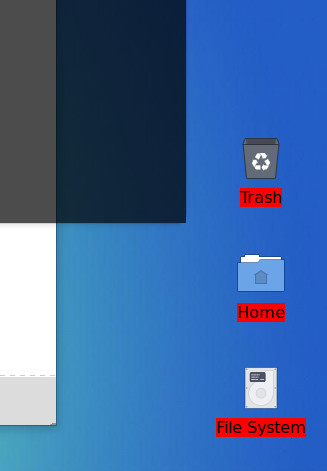
Added later 03 min 02 s:
I'm not sure when it was added, but custom label backgrounds were added to xfdesktop. Does the following command return anything:
xfconf-query -c xfce4-desktop -p /desktop-icons/use-custom-label-background-color...or look at the Desktop Icons tab in xfdesktop settings.
Mark solved threads as [SOLVED] to make it easier for others to find solutions.
--- How To Ask For Help | FAQ | Developer Wiki | Community | Contribute ---
Offline
#8 2026-11-09 20:50:21
- zChris
- Member
- Registered: 2026-11-08
- Posts: 6
Re: [SOLVED] Unable to theme background desktop labels
That command returns true and my icons look like this https://i.imgur.com/Tkr0Bz8.png

And everytime i make a change in gtk.css i run xfdesktop -Q && xfdesktop &
Last edited by zChris (2026-11-09 20:52:44)
Offline
#9 2026-11-09 22:12:03
- ToZ
- Administrator
- From: Canada
- Registered: 2011-06-02
- Posts: 12,736
Re: [SOLVED] Unable to theme background desktop labels
That command returns true
Go to Desktop Settings and on the Desktop Icons tab, uncheck "Label background color".
Mark solved threads as [SOLVED] to make it easier for others to find solutions.
--- How To Ask For Help | FAQ | Developer Wiki | Community | Contribute ---
Offline
#10 2026-11-10 20:33:53
- zChris
- Member
- Registered: 2026-11-08
- Posts: 6
Re: [SOLVED] Unable to theme background desktop labels
A huge thanks! That was the issue 
Offline
- Registered users online in this topic: 0, guests: 1
- [Bot] ClaudeBot
[ Generated in 0.010 seconds, 7 queries executed - Memory usage: 559.67 KiB (Peak: 576.63 KiB) ]